Admin Guide
Admin Guide
The platform console used by DigitalKey staff to run every business on the system.
Last updated 2026-10-13
DigitalKey ERP — Docs · digital-key.co/docs/admin
ImportantThis section is for platform administrators only. Admin accounts are not scoped to a business — they can see and change every tenant, every user and every balance on the platform.
Overview
Admin accounts live in a separate table from ERP users and sign in through the same login page. There is no tenant attached, so nothing in the console is filtered by business.
Admin — Admin dashboard
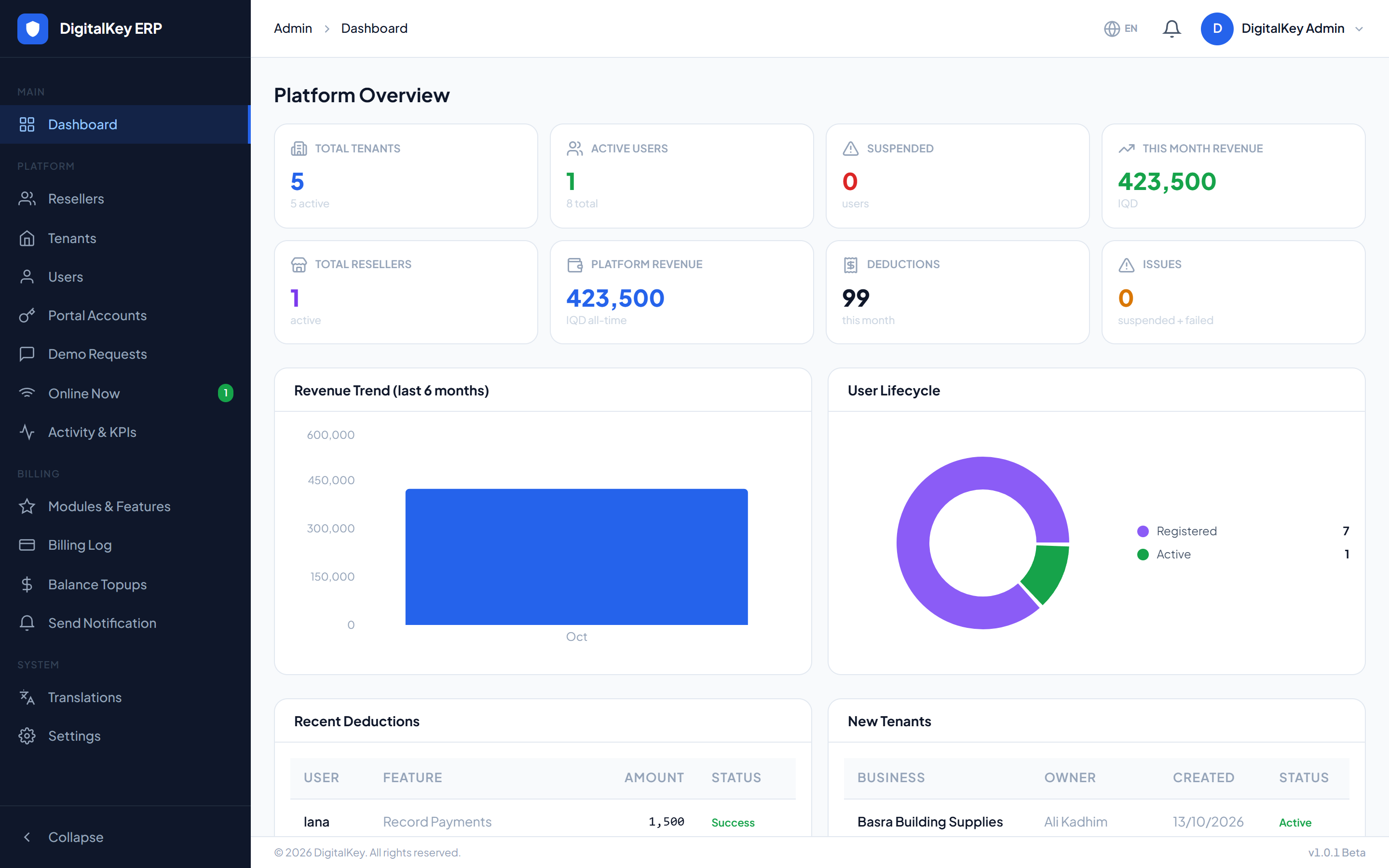
Dashboard KPIs
GET /api/v1/admin/dashboard
| Parameter | Type | Required | Description |
|---|---|---|---|
total_tenants | integer | Optional | Businesses on the platform. |
active_tenants | integer | Optional | Businesses currently enabled. |
total_users | integer | Optional | ERP users across all businesses. |
active_users | integer | Optional | Users currently enabled. |
suspended_users | integer | Optional | Users in temp_suspend or suspend. |
total_resellers | integer | Optional | Reseller partners. |
total_platform_revenue | decimal | Optional | All revenue collected to date, in IQD. |
this_month_revenue | decimal | Optional | Revenue collected this month. |
deductions_this_month | integer | Optional | Number of deductions run this month. |
pending_issues | integer | Optional | Suspended users plus failed deductions this month — the number to act on. |
Warning
pending_issues is the health figure. A rising number means customers are hitting balance problems and will start losing access within ten days.Activity feed
GET /api/v1/admin/dashboard/activity
| Parameter | Type | Required | Description |
|---|---|---|---|
revenue_trend[] | array | Optional | Revenue per month for the trend chart. |
lifecycle[] | array | Optional | How many users sit in each lifecycle state. |
recent_deductions[] | array | Optional | Latest deductions with user, amount and status. |
recent_tenants[] | array | Optional | Most recently created businesses. |
What the console controls
| Area | What it does |
|---|---|
| Tenants | Create businesses, assign them to resellers, enable and disable them. |
| Users | Create users, set features, reset passwords, top up balances. |
| Resellers | Create partners, set commission, credit their balance. |
| Billing | Run daily billing, read the deduction and top-up logs. |
| Features | Edit the feature catalogue and its prices. |
| Settings | Grace periods, warning threshold and platform values. |
| Translations | Override any interface string in any of the three languages. |
| Demo requests | Requests submitted from the public site. |
| Notifications | Broadcast a message to a tenant or a role. |
| Portal Accounts | Every customer portal login each business has created, grouped by business: customer, login phone, on/off, last login and created date. View only — passwords are never shown. |
| Online Now | Who is signed in at this moment, refreshed automatically. |
| Activity & KPIs | Who is actually using the platform: per business and per user, how many sales, purchases, expenses, payments and other records they created today and over a chosen period, and when they were last active. |
| Balance Topups | The log of every top-up, exportable. |
Editing the feature catalogue
POST/PUT /api/v1/admin/features
| Parameter | Type | Required | Description |
|---|---|---|---|
module_id | integer | Required | Module the feature belongs to. |
feature_key | string | Required | The key checked in code, such as pos.invoice_print. |
feature_name | string | Required | Display name. |
description | string | Optional | What the feature does. |
monthly_price_iqd | decimal | Required | Monthly price in IQD. |
sort_order | integer | Optional | Position within its module. |
is_active | boolean= true | Optional | Whether it can be subscribed to. |
Important
feature_key is what the application checks in code. Changing the key of an existing feature silently breaks every gate that references it — existing subscribers lose access to a capability they are still paying for. Change prices and names freely; treat keys as permanent.Admin versus reseller
NoteResellers do much of the same work but only for their own tenants, and they fund top-ups from their own balance rather than creating credit. See the Reseller Guide.