Finance
Profit & Loss
The report that answers whether the business made money over a period, and where it went if it did not.
Last updated 2026-10-13
DigitalKey ERP — Docs · digital-key.co/docs/finance/profit-loss
Requires subscription
finance.pl3,000 IQD / monthHow the report is built
P&L structure
  Revenue                    what you sold
− Cost of goods sold       what those goods cost you
─────────────────────────
= Gross profit
  Gross margin %           gross profit ÷ revenue

− Expenses                 broken down by category
─────────────────────────
= Net profit
  Net margin %             net profit ÷ revenue
Finance — Profit and loss report
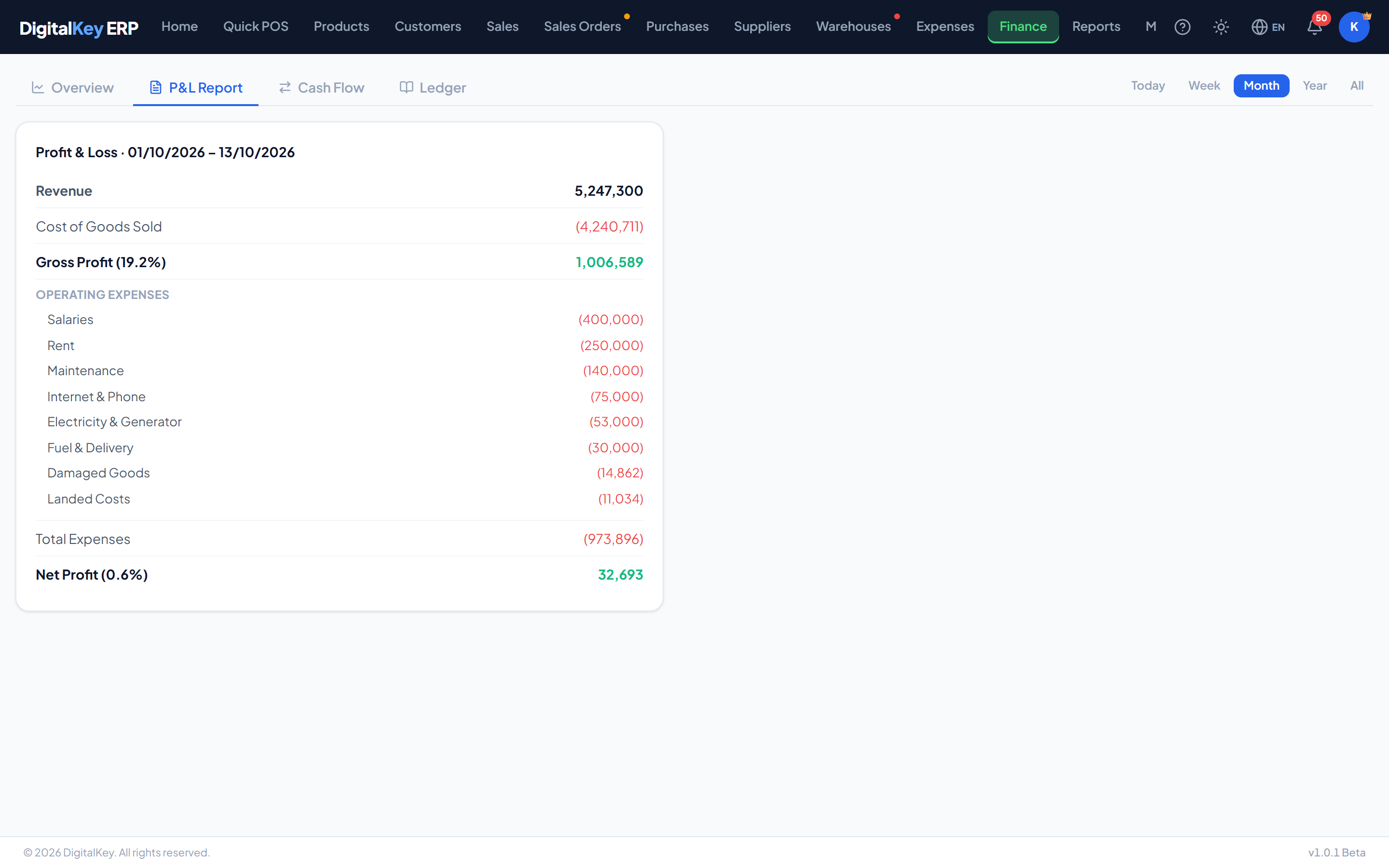
Report fields
GET /api/v1/finance/profit-loss
| Parameter | Type | Required | Description |
|---|---|---|---|
from_date | date | Required | Start of the period. |
to_date | date | Required | End of the period. |
revenue | decimal | Optional | Total sold in the period, after discounts. |
cogs | decimal | Optional | Cost of the goods sold in that revenue. |
gross_profit | decimal | Optional | Revenue less cost of goods sold. |
gross_margin_pct | decimal | Optional | Gross profit as a percentage of revenue. |
expenses[].category | string | Optional | Expense category name. |
expenses[].amount | decimal | Optional | Total for that category in the period. |
total_expenses | decimal | Optional | All expenses in the period. |
net_profit | decimal | Optional | Gross profit less total expenses. |
net_margin_pct | decimal | Optional | Net profit as a percentage of revenue. |
How cost of goods sold is calculated
Each line of a sale is stamped with the product's cost at the moment it is sold — for a sales order, at completion. Cost of goods sold adds up those stamped costs for the lines sold in the period. It reflects what the goods you sold cost you — not what you spent on stock during the period, and not what the product costs today.
Past profit does not moveBecause the cost is frozen on the line, editing a product's cost or receiving stock at a new price never changes the profit of a sale already made. The product's own cost is a weighted average of what you have bought — see Product Cost.
Cost prices decide whether this report is trueEvery profit figure here depends on costs being right at the time of sale. A product sold while its cost was zero shows as pure profit and quietly inflates both margins. Enter real costs when receiving goods, and add customs and transport as landed costs.
Returns, damage and landed costs
- Returns reduce revenue and cost of goods in the month the return is made. A September sale returned in October reduces October.
- Damage write-offsappear as an expense at the product's average cost. The loss is real even though no money left.
- Landed costsfor goods already sold appear under the “Landed Costs” expense category; the rest reaches this report through cost of goods as the stock sells.
- Draft orders are not here at all until they are completed.
NoteBuying stock is not an expense in this report — it becomes cost of goods sold when the stock is sold. That is why a month of heavy purchasing does not depress profit on its own, and why Cash Flowis the better report for “where did the money go”.
Reading the margins
- Gross margin — what your pricing earns before running costs. It moves when purchase costs or selling prices change, or when discounting rises.
- Net margin — what is actually left. A healthy gross margin with a poor net margin points at overheads rather than pricing.
TipCompare the two over several months rather than reading one month alone. A gross margin sliding while prices are unchanged usually means discounting or rising supplier costs — both visible elsewhere in the system.
Choosing the period
The report takes any date range. Month boundaries make comparison easiest, but a custom range is useful for a season, a promotion or a single trading week.
WarningVoided sales and voided expenses are excluded. Voiding something from a closed period changes that period's reported profit, so a P&L printed last month may not match the same report run today. That is why older mistakes are better corrected with a return — it lands in the current month — and why an invoice can only be edited in the month it was made.
Related
- Cash Flow — profit is not the same as money in the bank.
- Managing Expenses — the categories that appear here.
- Adding Products — where cost prices are set.