Returns
When a customer brings goods back — part of an invoice or all of it — and the sale itself was real.
DigitalKey ERP — Docs · digital-key.co/docs/sales/returns
Overview
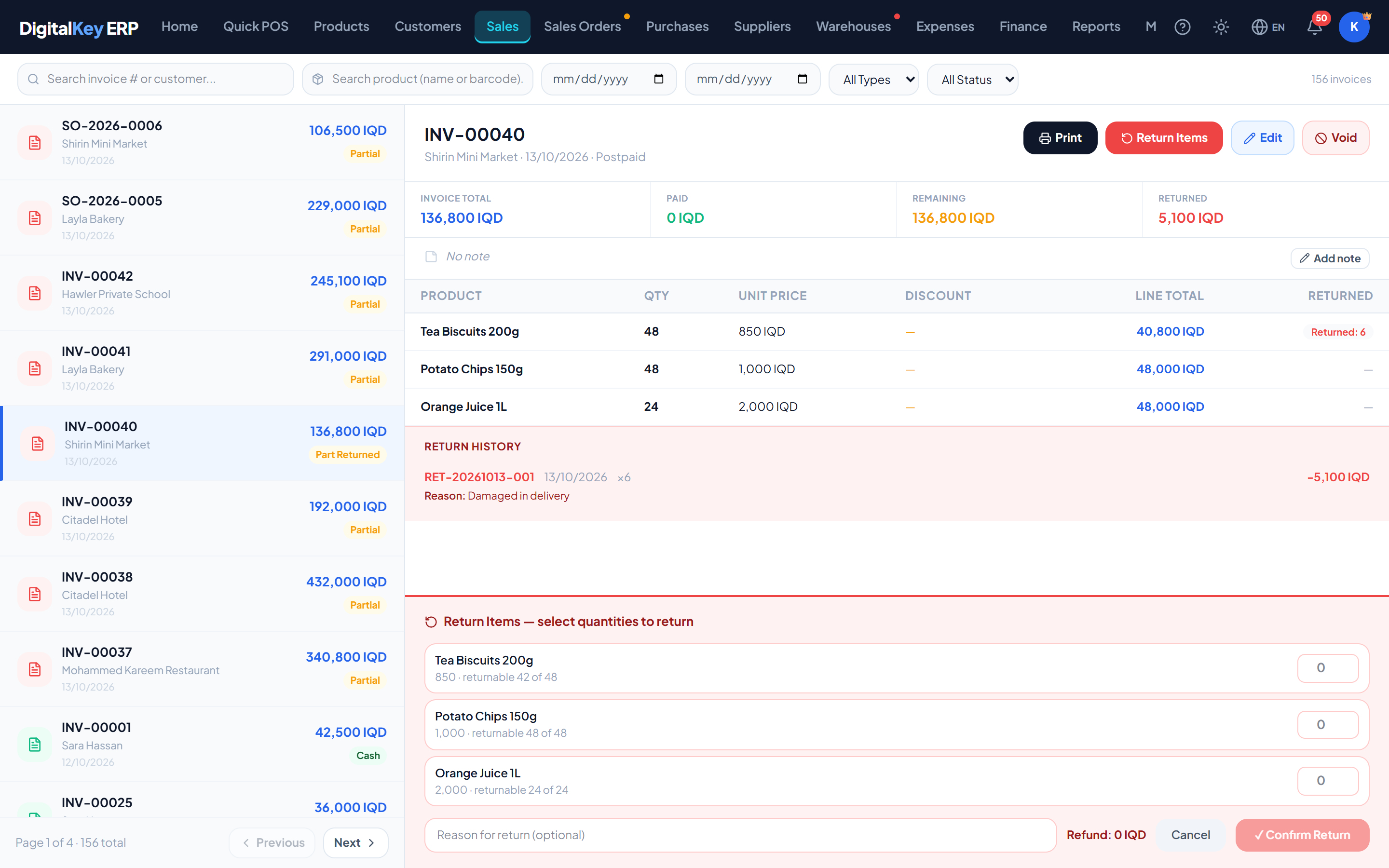
A return is recorded against the invoice the goods were sold on. The invoice stays valid; the return sits beside it with its own number, date and reason. Stock comes back, and the customer is refunded or owes less.
Who can return
The owner, and any staff member with Make a return — which is on by default and can be switched off per person in My Account → Team → Permissions.
- 1
Open the invoice
Find it in Sales — by number, customer, product or date — and select it.
- 2
Choose Return Items
Each line shows how much of it can still be returned. Type the quantity coming back on each line; leave the rest at zero.
- 3
Add a reason (optional)
Damaged, wrong item, changed their mind — it is kept on the return.
- 4
Confirm Return
The refund shown is worked out from the price the customer actually paid on each line, after its discount. Confirming puts the stock back and settles the money.
What a return does
- Stock — the returned units go back on the shelf, at the cost they left at. A carton line comes back as its pieces.
- Money — on a sale that was paid for, the refund is cash going out. On a credit sale no money moves: the return reduces what the customer owes.
- Revenue and cost of goods — both are reduced, so returned units stop counting as sold.
- The invoice — marked Part Returned or Fully Returned, with the return listed in its Return History.
Returning in more than one go
A partly returned invoice can be returned against again, up to the quantity originally sold on each line. When one product sits on two lines of an invoice — a carton and loose pieces — each line is returned separately, at its own price.
Where returns show up
| Parameter | Type | Required | Description |
|---|---|---|---|
Finance | net | Optional | Revenue, cost of goods and cash are all net of returns, in the period of the return. |
Dashboard | net | Optional | Headline sales figures are net of returns. |
Sales report | net / gross | Optional | The total revenue is net of returns. The grouped breakdowns — top products, top customers, per day — are gross, so they can add up to more than the total when there are returns. |
Customer statement | entry | Optional | A return on a credit sale appears as a reduction of the balance. |
Advanced Dynamic Report | column | Optional | Shows quantity sold, quantity returned and net quantity side by side. |
| Parameter | Type | Required | Description |
|---|---|---|---|
reason | string | Optional | Why the goods came back. |
items[].item_id | integer | Required | The invoice line being returned against. |
items[].qty | decimal | Required | Quantity coming back on that line, in the line's own unit. |
Returns to a supplier
Sending goods back to a supplier is a separate document — a purchase return. See Purchases.
Related
- Void a Sale — when the whole sale should not exist.
- Edit an Invoice — correcting this month's invoice.
- Profit & Loss — how returns reduce revenue.