Settings
PO Print Settings
How the document you send a supplier looks — set separately from the invoice you hand a customer.
Last updated 2026-10-13
DigitalKey ERP — Docs · digital-key.co/docs/settings/po-print-settings
Overview
A purchase order goes to a supplier and a sales invoice goes to a customer, and the two rarely want the same layout. PO Print Settings apply only to the printed purchase. They live under My Account → PO Print, shown to any business with a purchases feature, with a live A4 preview beside the form.
My Account — PO Print Settings
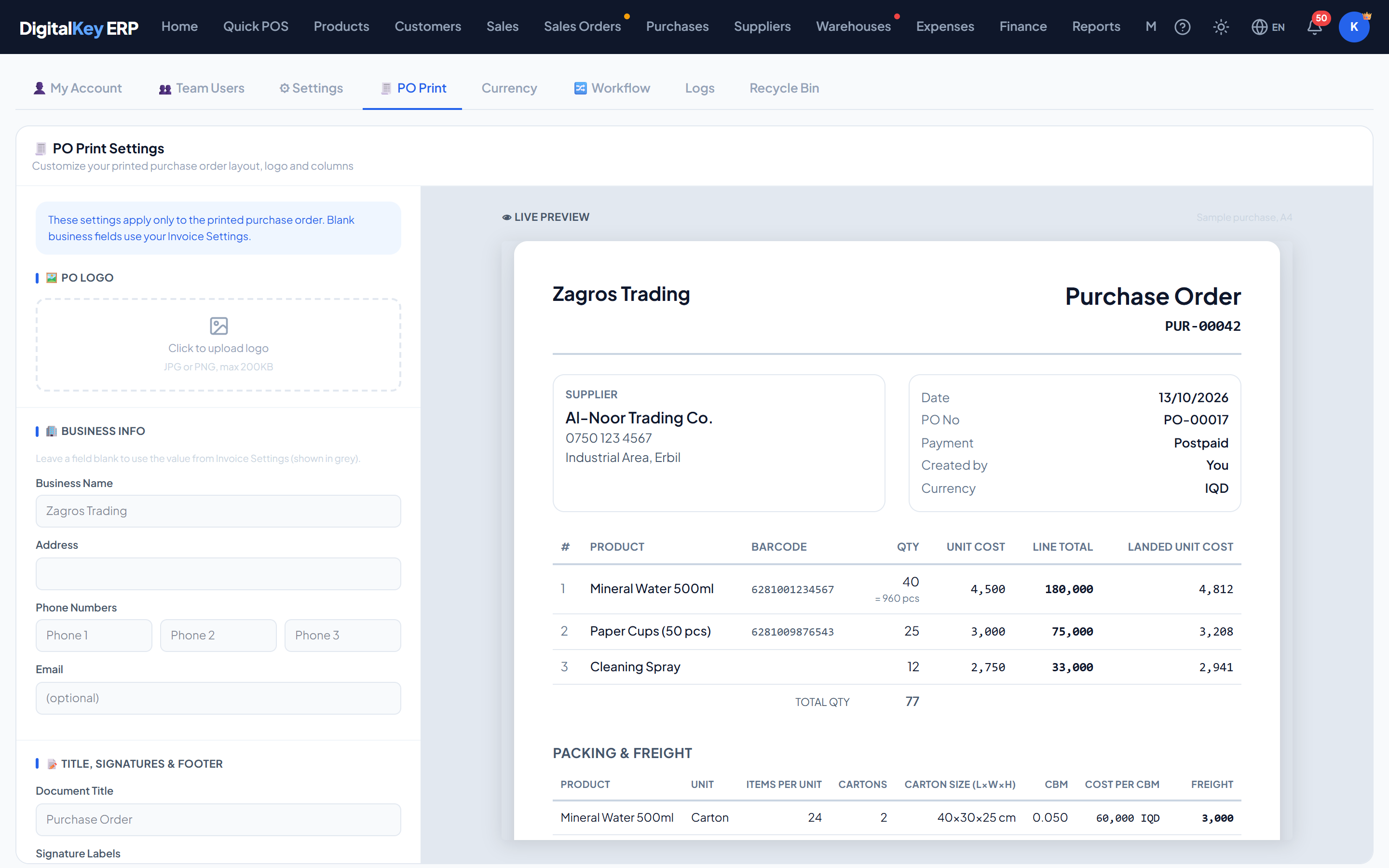
NoteAnything left blank falls back to your Invoice Settings. The fallback value is shown in grey in the field, so you can see what will print.
Logo
A logo just for purchase documents. JPG or PNG, up to 200KB. With no PO logo, the invoice logo is used.
Business info
| Parameter | Type | Required | Description |
|---|---|---|---|
Business Name | string | Optional | The name to print. Blank uses the invoice setting. |
Address | string | Optional | Blank uses the invoice setting. |
Phone Numbers | string | Optional | Up to three. Blank uses the invoice setting. |
Email | string | Optional | Blank uses the invoice setting. |
Title, signatures and footer
| Parameter | Type | Required | Description |
|---|---|---|---|
Document Title | string | Optional | The heading on the page — Purchase Order by default. |
Signature Labels | string | Optional | The captions under the signature lines. |
Footer Text | string | Optional | For example “Please deliver by the agreed date”. |
Footer Note | string | Optional | Small print, for example “Goods must match the order”. |
Item columns
The product name is always printed. The rest can be switched on or off:
| Parameter | Type | Required | Description |
|---|---|---|---|
# Row No. | toggle | Optional | Line number. |
Barcode | toggle | Optional | The product's barcode. |
Qty | toggle | Optional | Quantity. |
Unit Cost | toggle | Optional | Cost per unit, as the supplier billed it. |
Line Total | toggle | Optional | Line total. |
Landed Unit Cost | toggle | Optional | The unit cost including customs and transport. Appears only when the purchase has landed costs. |
WarningLanded Unit Cost shows what the goods cost you. Leave it off on anything that goes to the supplier — it is for your own records.
Sections
| Parameter | Type | Required | Description |
|---|---|---|---|
Supplier phone & address | toggle | Optional | The supplier's contact details under their name. |
Payment type | toggle | Optional | Cash or postpaid. |
Created by | toggle | Optional | Who recorded the purchase. |
Packing & freight | toggle | Optional | The packing rows — unit, items per unit, carton size, CBM and freight. |
Landed costs | toggle | Optional | The landed charges applied to the purchase. |
Paid & Remaining | toggle | Optional | The payment summary. |
Notes | toggle | Optional | The purchase's notes. |
Signatures | toggle | Optional | The signature lines. |
Endpoints — /api/v1/po-print-settings
| Parameter | Type | Required | Description |
|---|---|---|---|
GET / | endpoint | Optional | The current settings. |
PUT / | endpoint | Optional | Save the settings. |
POST /logo | endpoint | Optional | Upload the PO logo. |
DELETE /logo | endpoint | Optional | Remove it. |
Related
- Purchase Orders — printing an order.
- Invoice Settings — the customer-facing invoice.
- Landed Costs & Cost Mode — where the landed unit cost comes from.