Product Management
Your catalogue. Everything you sell has a product record, and the POS, sales orders, purchases and stock all read from it.
DigitalKey ERP — Docs · digital-key.co/docs/products
product.access4,000 IQD / monthOverview
Products are the centre of the system: the POS sells them, purchases restock them, warehouses hold them and reports measure them. A product belongs to one business and is never visible to another.
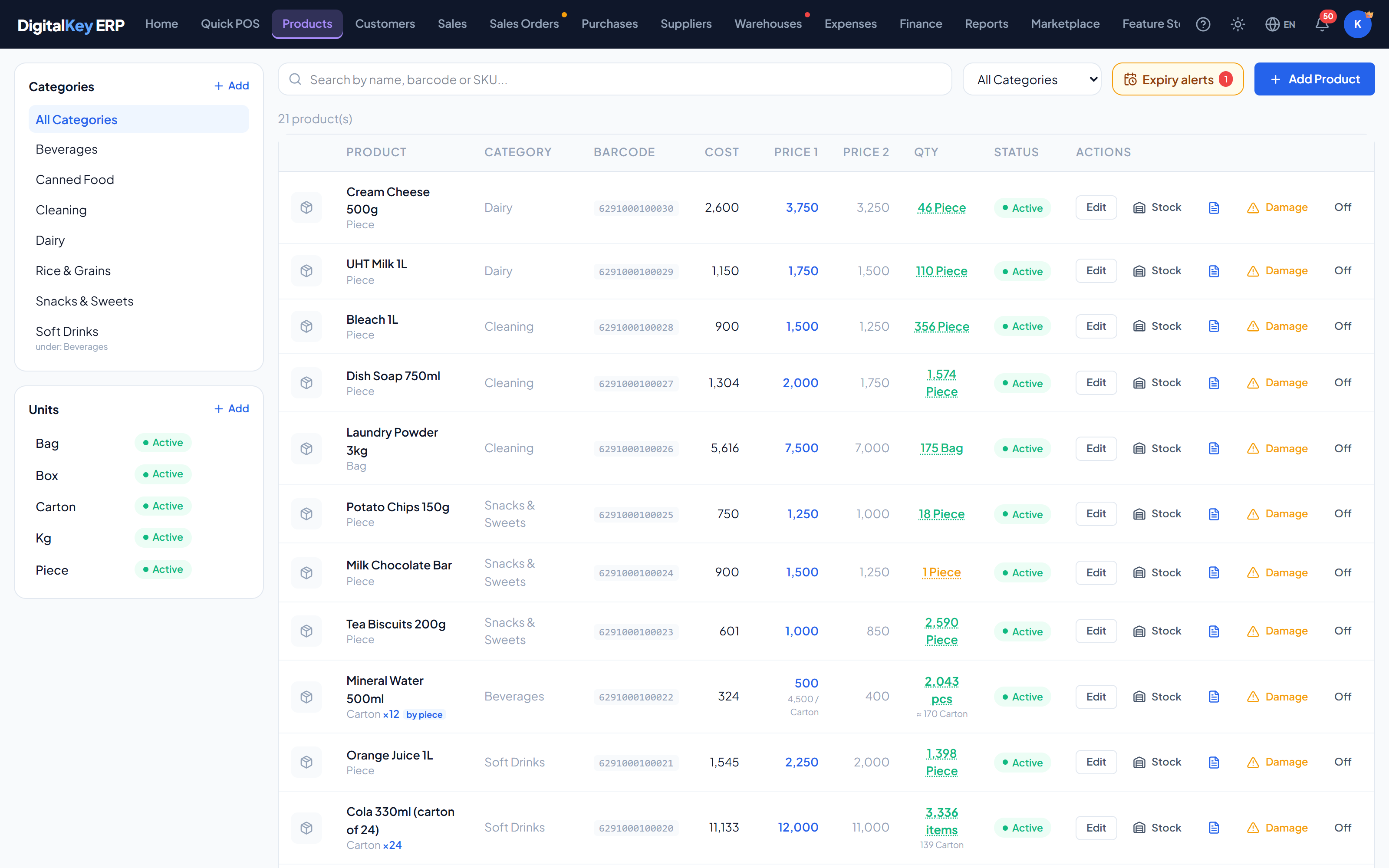
Finding a product
The search box matches on name, SKU and barcode at once, so you can type a few letters of the name or scan a barcode into the same field. The list can also be filtered by category.
What the list shows
| Parameter | Type | Required | Description |
|---|---|---|---|
product_id | integer | Optional | Internal identifier. |
name | string | Required | Product name, as it appears in the POS and on invoices. |
category_name | string | Optional | Resolved category name, from category_id. |
unit_name | string | Optional | Resolved unit name, from unit_id. |
barcode | string | Optional | Barcode, used by scanner search. |
sku | string | Optional | Your own stock-keeping code. |
purchase_price | decimal | Optional | What the item costs you — a weighted average of what you have bought. Hidden from staff without “See purchase price & profit”. |
sell_price1 | decimal | Optional | Retail price — the default selling price. Per piece for a product sold by the piece. |
sell_price2 | decimal | Optional | Wholesale price — the second price level. |
pack_price | decimal | Optional | Carton price, for a product sold by the piece. |
sell_by_piece | boolean | Optional | Whether stock, cost and price count single pieces. Shown as a “by piece” badge. |
qty_in_stock | decimal | Optional | Current quantity on hand. |
qty_alert | decimal | Optional | Low-stock threshold. At or below this, the item is flagged. |
is_active | boolean | Optional | Inactive products are hidden from selling but keep their history. |
The two price levels
Every product carries two selling prices. sell_price1 is retail and is used unless you say otherwise; sell_price2 is wholesale. Sales orders carry a price_level of 1 or 2 to pick between them per order.
sell_price1 and leave sell_price2 at zero. Nothing forces you to use the second level.Actions on a product
| Parameter | Type | Required | Description |
|---|---|---|---|
Edit | Add / edit products | Optional | Open the product form. |
Stock | — | Optional | Quantity per warehouse, with the alert level and status. |
Purchases | — | Optional | Every purchase this product was received on: number, date, supplier, quantity and cost. |
Damage | product.damage | Optional | Write off broken or expired stock as a loss. |
Sell by the piece | Add / edit products | Optional | Switch between counting cartons and counting pieces. |
On / Off | Switch products on/off | Optional | Deactivate or reactivate the product. |
Expiry alerts
The Expiry alerts button lists products in stock that are expired or about to expire, with the quantity and stock value at risk. The owner sets how many days ahead the warning starts.
Deleting products
is_active set to false and simply stops appearing in the POS. The owner can bring it back from the recycle bin.In this section
- Adding Products — every field on the form.
- Sell by the Piece — cartons in, pieces out.
- Product Cost — the weighted average and frozen costs.
- Categories — grouping the catalogue.
- Units — units of measure and pack sizes.
- Stock Management — quantities, alerts, damage and movements.