Feature Store
The full catalogue of what you can switch on, what each one costs per month, and what happens to your balance when you do.
DigitalKey ERP — Docs · digital-key.co/docs/feature-store
Overview
DigitalKey ERP is sold by the feature. There is no bundle to buy — you subscribe to the individual capabilities you need, each at its own monthly price in IQD, and your monthly bill is the sum of them. Subscription prices are in Iraqi Dinar whatever currency your business works in.
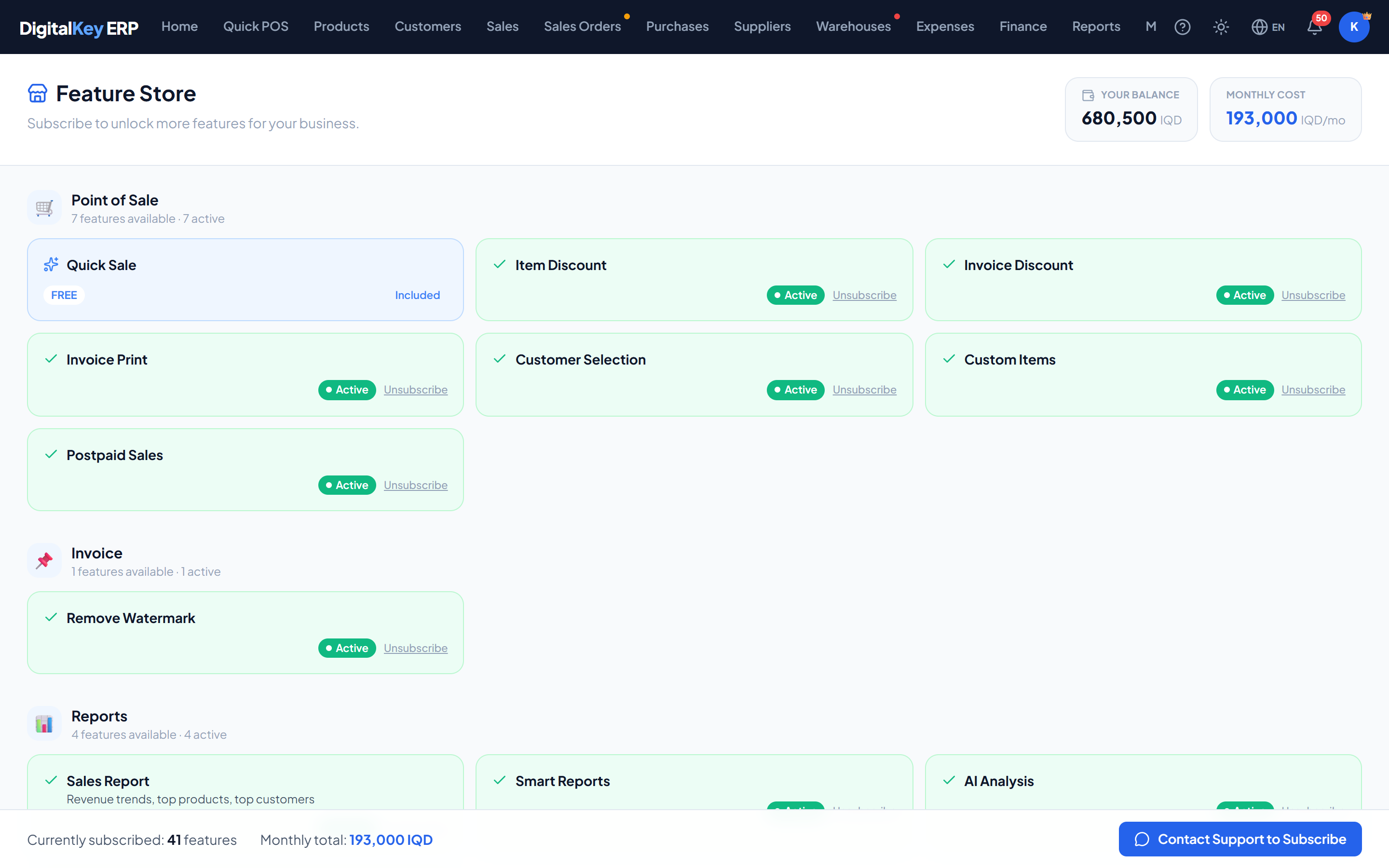
How subscribing works
- 1
Open the Feature Store
Choose Feature Store from the navigation bar. Your balance and current monthly cost are shown at the top.
- 2
Find the feature
Features are grouped by module. Anything already subscribed is marked Active, and the price is shown against the rest.
- 3
Press Subscribe
This opens a WhatsApp message to DigitalKey support naming the feature. Subscriptions are switched on for you by the platform administrator or your reseller — not from inside the ERP.
- 4
It is switched on
The first month of the new feature is charged straight away, and the capability becomes available — locked controls unlock without signing out and back in.
Unsubscribe works the same way: it sends a request, and the administrator or reseller removes the feature.
Point of Sale
| Parameter | Type | Required | Description |
|---|---|---|---|
pos.quick_sale | 0 IQD | Required | Quick Sale — the POS screen itself. Free and required for selling. |
pos.customer_select | 2,000 IQD | Optional | Attach a customer to a sale. |
pos.discount_item | 2,000 IQD | Optional | Discount per item. |
pos.discount_total | 2,000 IQD | Optional | Discount on the invoice total. |
pos.extra_sell | 3,000 IQD | Optional | Sell an unregistered item as free text. |
pos.postpaid | 3,000 IQD | Optional | Credit and postpaid sales. |
pos.invoice_print | 5,000 IQD | Optional | Generate and print the sale invoice. |
invoice.remove_watermark | 5,000 IQD | Optional | Remove the DigitalKey mark from printed invoices. |
Products
| Parameter | Type | Required | Description |
|---|---|---|---|
product.access | 4,000 IQD | Optional | The Products screen — create, edit and switch off products, categories and units. |
product.image_upload | 2,000 IQD | Optional | Upload product photos. |
product.damage | 3,000 IQD | Optional | Write off damaged stock as a loss. |
market.publish | 10,000 IQD | Optional | Marketplace Shop — publish products on the DigitalKey B2B marketplace and receive orders from buyers. |
Customers
| Parameter | Type | Required | Description |
|---|---|---|---|
customer.debt_alerts | 1,000 IQD | Optional | Badges and alerts for customers carrying debt, and the debt schedule. |
customer.payments | 1,500 IQD | Optional | Record payments against a customer. |
customer.sub_accounts | 1,500 IQD | Optional | Sub-customers — split a customer's debt across the people under them. |
customer.whatsapp_share | 2,000 IQD | Optional | Share invoices, statements and receipts by link. |
customer.statement | 2,500 IQD | Optional | Print a full account statement. |
customer.manage | 3,000 IQD | Optional | Customer records — the core of the module. |
customer.portal | 5,000 IQD | Optional | Customer self-service portal. |
customer.old_debt | 10,000 IQD | Optional | Track legacy debt separately from trading debt. |
Purchases
| Parameter | Type | Required | Description |
|---|---|---|---|
purchase.payments | 1,500 IQD | Optional | Record payments to suppliers. |
purchase.suppliers | 2,000 IQD | Optional | Supplier records and balances. |
purchase.receive | 2,000 IQD | Optional | Receive goods against an order. |
purchase.orders | 3,000 IQD | Optional | Raise purchase orders. |
purchase.manage | 5,000 IQD | Optional | Purchase invoices — the core of the module. |
Inventory
| Parameter | Type | Required | Description |
|---|---|---|---|
warehouse.alerts | 2,000 IQD | Optional | Low-stock alerts per location. |
warehouse.transfer | 3,000 IQD | Optional | Transfer stock between warehouses. |
warehouse.manage | 5,000 IQD | Optional | Multiple warehouses and adjustments. |
Expenses
| Parameter | Type | Required | Description |
|---|---|---|---|
expense.view | 1,000 IQD | Optional | View the expense list and summary. |
expense.delete | 1,000 IQD | Optional | Delete expense entries. |
expense.categories | 1,000 IQD | Optional | Manage expense categories. |
expense.add | 2,000 IQD | Optional | Add and edit expenses. |
Finance
| Parameter | Type | Required | Description |
|---|---|---|---|
finance.debts | 2,000 IQD | Optional | Customer and supplier debt tables. |
finance.view | 3,000 IQD | Optional | Financial overview and summary. |
finance.pl | 3,000 IQD | Optional | Full profit and loss breakdown. |
Reports
| Parameter | Type | Required | Description |
|---|---|---|---|
report.sales | 2,000 IQD | Optional | Sales history, the sales report and the discounts report. |
report.advanced_dynamic | 2,000 IQD | Optional | Advanced Dynamic Report — who bought what, and from whom. |
reports.smart_reports | 20,000 IQD | Optional | Dead stock, at-risk customers and best sellers. Includes the sales and discounts reports. |
reports.ai_analysis | 20,000 IQD | Optional | AI marketing recommendations in KU, AR or EN. |
Sales Orders
| Parameter | Type | Required | Description |
|---|---|---|---|
sales_order.basic | 20,000 IQD | Optional | Sales orders with the simple draft-to-completed workflow. |
sales_order.custom_workflow | 25,000 IQD | Optional | The standard approval workflow with pending and approved stages. |
Features that are no longer sold
Eight features have been withdrawn from the catalogue. They cannot be bought and are no longer billed, but a user who already holds one keeps it working.
| Parameter | Type | Required | Description |
|---|---|---|---|
pos.barcode_search | withdrawn | Optional | Barcode search is now part of the normal search box, for everyone. |
pos.change_calc | withdrawn | Optional | Change calculator. |
pos.low_stock_alert | withdrawn | Optional | Low-stock warning at the counter. |
customer.payment_request | withdrawn | Optional | Payment requests from the portal. |
report.stock | withdrawn | Optional | Stock report. |
report.customer | withdrawn | Optional | Customer report. |
report.expense | withdrawn | Optional | Expense report. |
report.discount | withdrawn | Optional | Discount report — now opens with the Sales Report or Smart Reports. |
Working out your monthly cost
Your bill is the sum of the prices above for everything you subscribe to. A small shop running the counter properly might look like this:
| Parameter | Type | Required | Description |
|---|---|---|---|
pos.quick_sale | 0 IQD | Optional | Required, free. |
product.access | 4,000 IQD | Optional | Managing the catalogue. |
pos.discount_item | 2,000 IQD | Optional | Occasional line discounts. |
pos.invoice_print | 5,000 IQD | Optional | Printed receipts. |
TOTAL | 11,000 IQD | Required | Deducted on the billing day each month. |
Related
- How Billing Works — the monthly cycle.
- Lifecycle States — what happens if the balance runs out.
- My Account — what you currently pay for.
- Team & Permissions — switching features off per staff member.