Suppliers
Who you buy from, what you have bought from each, and what you still owe them.
DigitalKey ERP — Docs · digital-key.co/docs/purchases/suppliers
purchase.suppliers2,000 IQD / monthOverview
Suppliers have their own screen in the navigation. It opens with any of the purchase management, suppliers or supplier payments features.
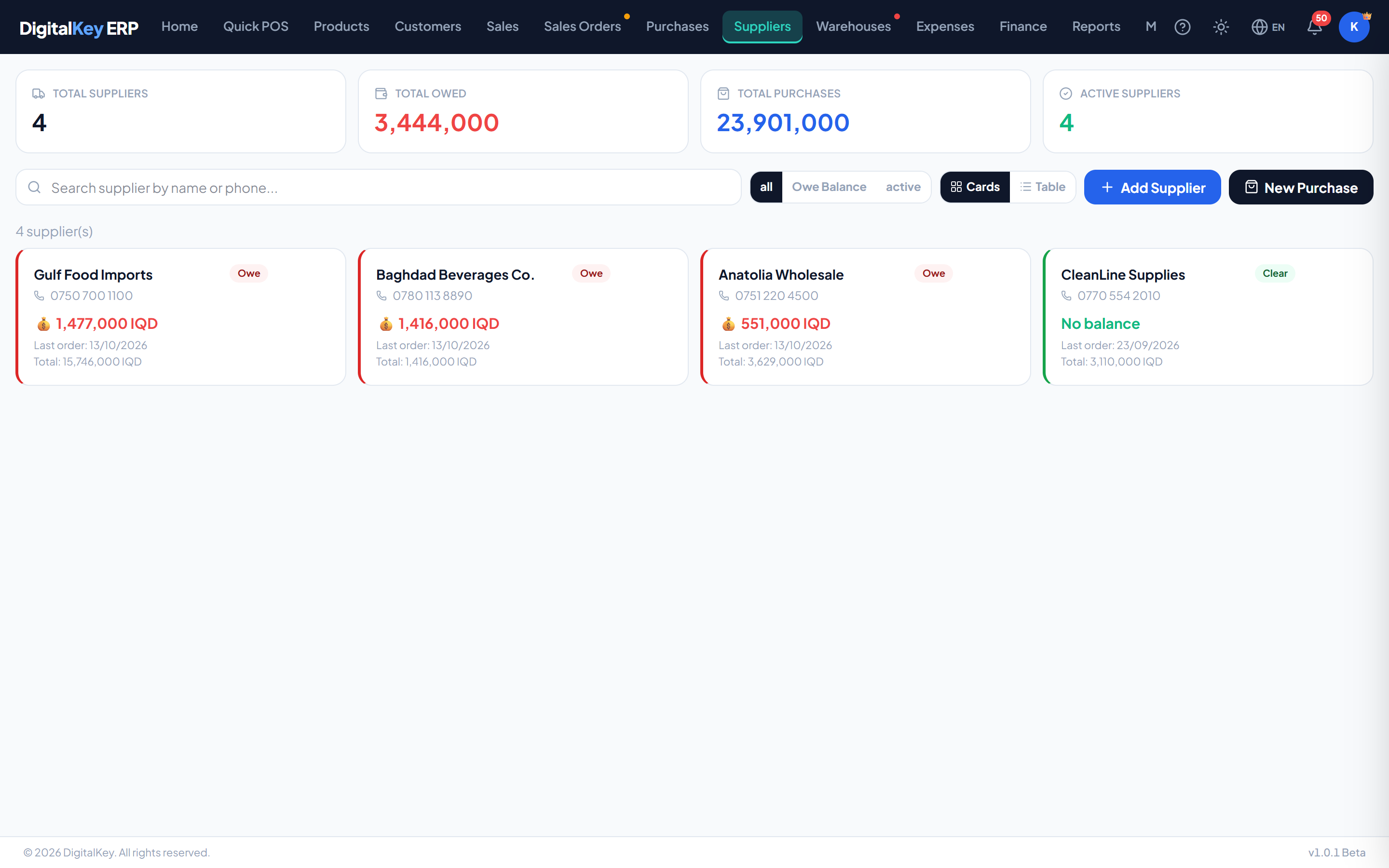
The list
Four figures sit above the list: total suppliers, total owed, total purchases and active suppliers. Search by name or phone, and filter to all suppliers, those you owe a balance, or the active ones. The table shows each supplier's number of orders, what you owe them and the date of their last order.
Supplier fields
| Parameter | Type | Required | Description |
|---|---|---|---|
name | string | Required | Supplier name. The only required field. |
phone | string | Optional | Phone number. Used by search. |
email | string | Optional | Email address. |
address | string | Optional | Address. Printed on purchase documents when switched on. |
opening_balance | decimal | Optional | What you already owed them when you started using the system. |
notes | string | Optional | Internal notes. |
The supplier drawer
Selecting a supplier opens a drawer with four tabs:
| Parameter | Type | Required | Description |
|---|---|---|---|
Stats | tab | Optional | Total purchased, number of purchase orders, the outstanding balance, gross purchased and net after returns, and how long they have been a supplier. |
Orders | tab | Optional | Every purchase from this supplier, with what remains unpaid on each. |
Payments | tab | Optional | Pay the supplier, and the history of payments with the balance after each. |
Info | tab | Optional | Their details, with Edit, Deactivate, New PO and Statement. |
Paying a supplier
purchase.payments1,500 IQD / monthA payment can be made against one purchase invoice (from the purchase itself) or against the supplier's balance (from the drawer). Either way what you owe goes down by the amount paid.
Supplier statement
Statementprints the supplier's ledger — purchases, returns and payments with a running balance. Like the customer statement it opens on this month, and can be switched to last month, this year, all time or any two dates.
Deactivating
Finding what was bought from whom
Two shortcuts answer the usual questions: the Purchases action on a product lists every purchase it arrived on, and the Advanced Dynamic Report shows everything bought from one supplier, or every supplier one product was bought from.
Related
- Purchases — invoices, returns and voids.
- Purchase Orders — ordering before goods arrive.
- Finance — supplier debt in the wider picture.