Managing Expenses
Everything the business spends that is not stock — rent, wages, utilities, transport. Without these, profit is only ever an estimate.
DigitalKey ERP — Docs · digital-key.co/docs/expenses
expense.view1,000 IQD / monthexpense.add2,000 IQD / monthOverview
Expenses are the second half of the profit calculation. Sales less cost of goods gives gross profit; only after expenses do you get the number that matters. An expense recorded here flows straight into profit and loss.
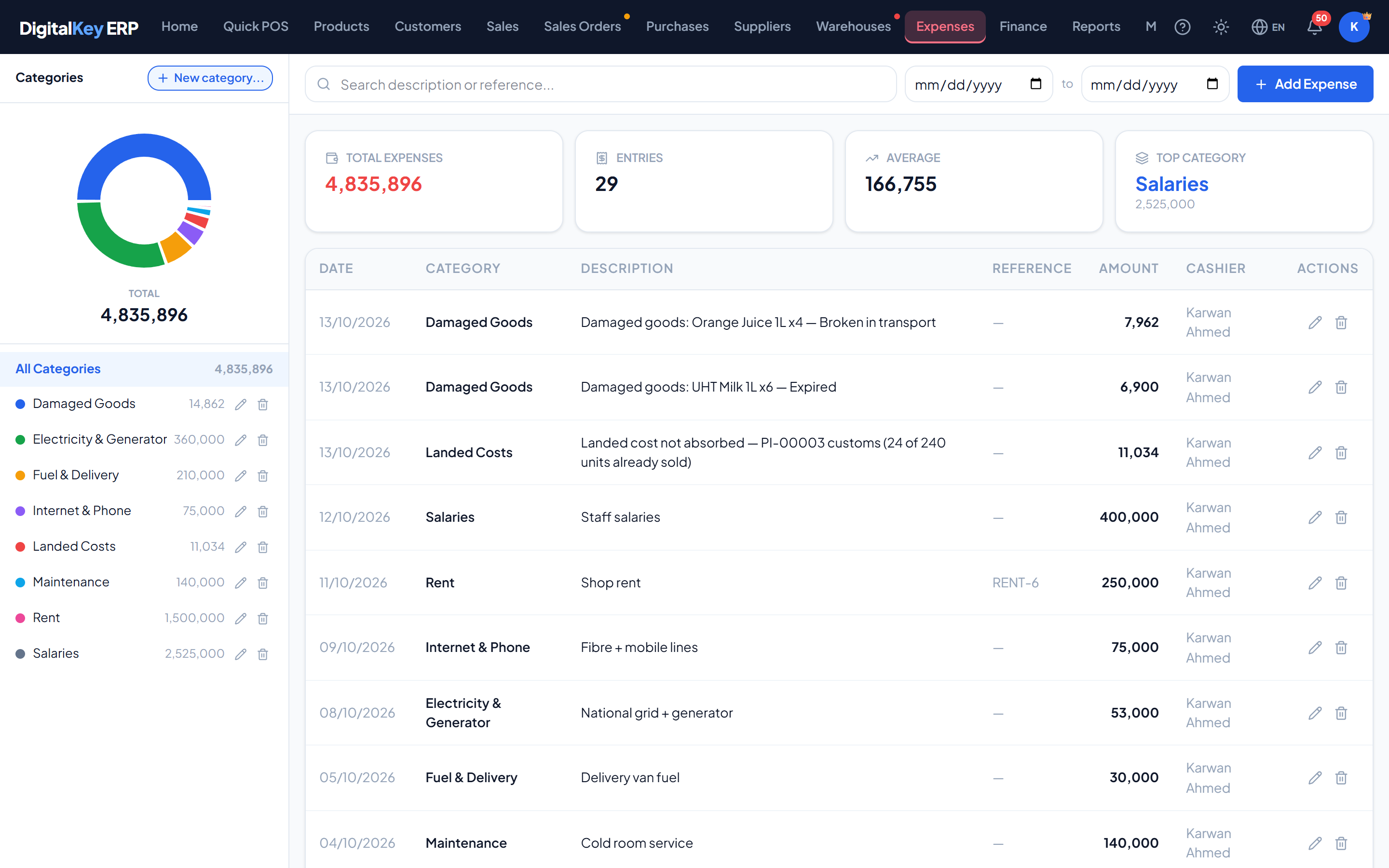
The expense features
| Parameter | Type | Required | Description |
|---|---|---|---|
expense.view | 1,000 IQD | Optional | See the expense list and summary. |
expense.add | 2,000 IQD | Optional | Add and edit expense entries. |
expense.delete | 1,000 IQD | Optional | Delete expense entries. |
expense.categories | 1,000 IQD | Optional | Create and manage expense categories. |
Categories
A category groups similar costs so the profit and loss breakdown is readable. A starter set is created with the business:
- Rent
- Utilities
- Salaries
- Transport
- Marketing
- Supplies
- Maintenance
- Miscellaneous
expense.categories1,000 IQD / month- 1
Open Expenses
Choose Expenses from the navigation menu.
- 2
Add an expense
Choose Add Expense to open the form.
- 3
Fill in the details
Enter the amount and pick a category. The date defaults to today — change it if you are entering something after the fact.
Expenses — Expense form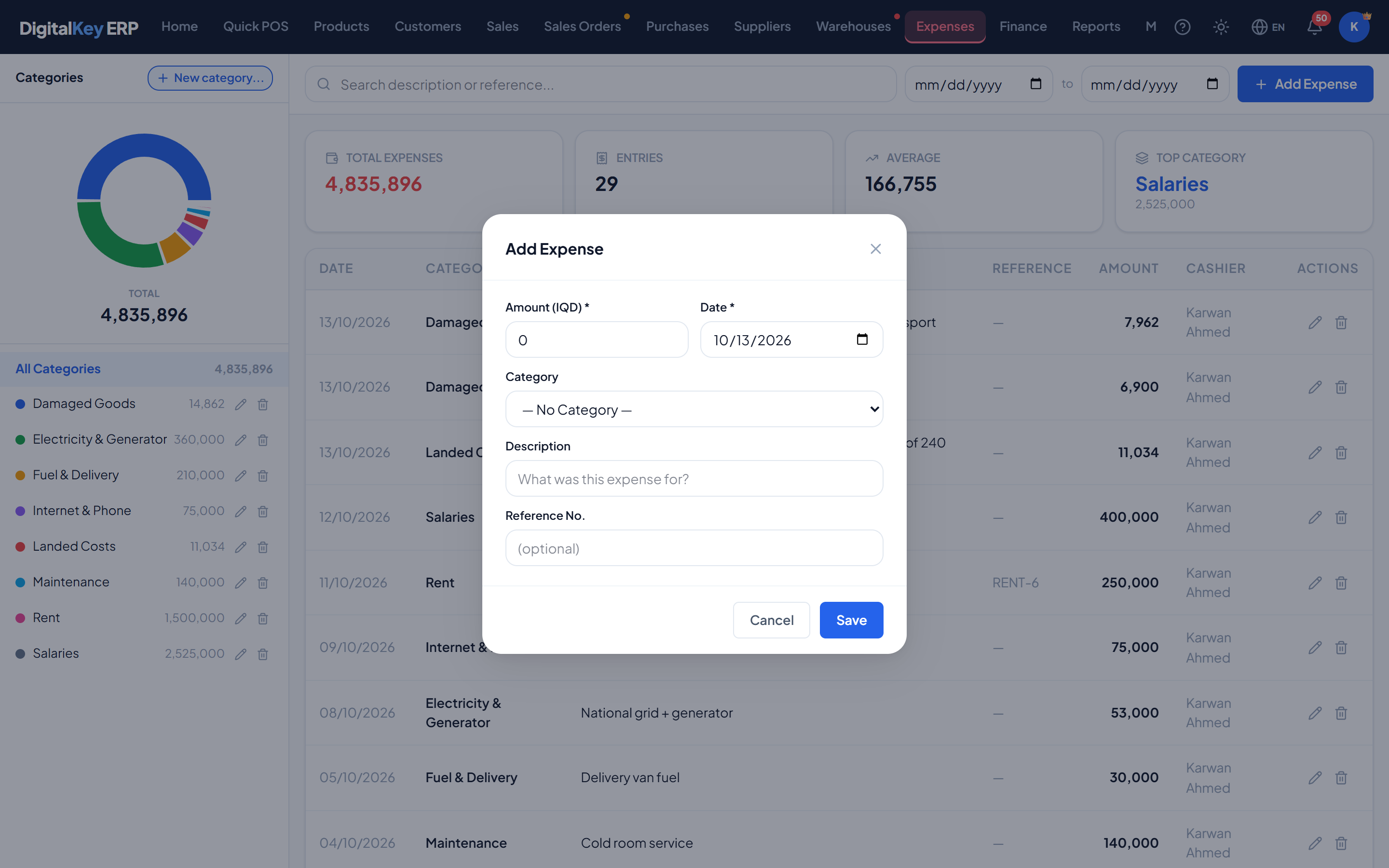
Expense form — Amount, category, date, description and reference number fields. - 4
Add a reference
Record the receipt or bill number so the entry can be tied back to paperwork later.
- 5
Save
The expense appears in the list and in this month's totals immediately.
Expense fields
| Parameter | Type | Required | Description |
|---|---|---|---|
cat_id | integer | Optional | Expense category. |
amount | decimal | Required | Amount spent. |
expense_date | date | Optional | When it was incurred. Defaults to today. |
description | string | Optional | What it was for. |
reference_no | string | Optional | Receipt, bill or voucher number. |
Filtering
| Parameter | Type | Required | Description |
|---|---|---|---|
cat_id | integer | Optional | Restrict to one category. |
from_date | date | Optional | On or after this date. |
to_date | date | Optional | On or before this date. |
search | string | Optional | Match on description or reference number. |
page | integer= 1 | Optional | Page number. |
page_size | integer= 50 | Optional | Rows per page. |
The summary
| Parameter | Type | Required | Description |
|---|---|---|---|
total_amount | decimal | Optional | Total spent in the period. |
total_count | integer | Optional | Number of entries. |
avg_amount | decimal | Optional | Average value of an entry. |
top_category_name | string | Optional | Category with the highest total. |
top_category_amount | decimal | Optional | How much that category came to. |
by_category[] | array | Optional | Total and count per category. |
monthly[] | array | Optional | Totals per month, for trend comparison. |
Voiding an expense
An expense entered in error is voided rather than erased. It keeps its place in the list, marked is_void, and stops counting toward totals and profit.
expense.delete1,000 IQD / monthExpenses raised automatically
Two kinds of expense are created by the system rather than typed in:
- Damage write-offs — writing off damaged stock posts the value of the loss as an expense, linked to the damage record. It is a loss in profit and loss but not cash going out: the stock left, not the money. See Stock Management.
- Landed Costs— when customs or transport is added to a purchase whose goods have partly been sold, the share belonging to the sold goods is booked under a “Landed Costs” category. Voiding the purchase later does not remove it; its description is annotated instead. See Landed Costs & Cost Mode.
Related
- Profit & Loss — where expenses land.
- Cash Flow — expenses as outflows.
- Reports — the expense breakdown report.