Recording Payments
How money coming in from a credit customer is applied to their balance.
DigitalKey ERP — Docs · digital-key.co/docs/customers/payments
customer.payments1,500 IQD / monthOverview
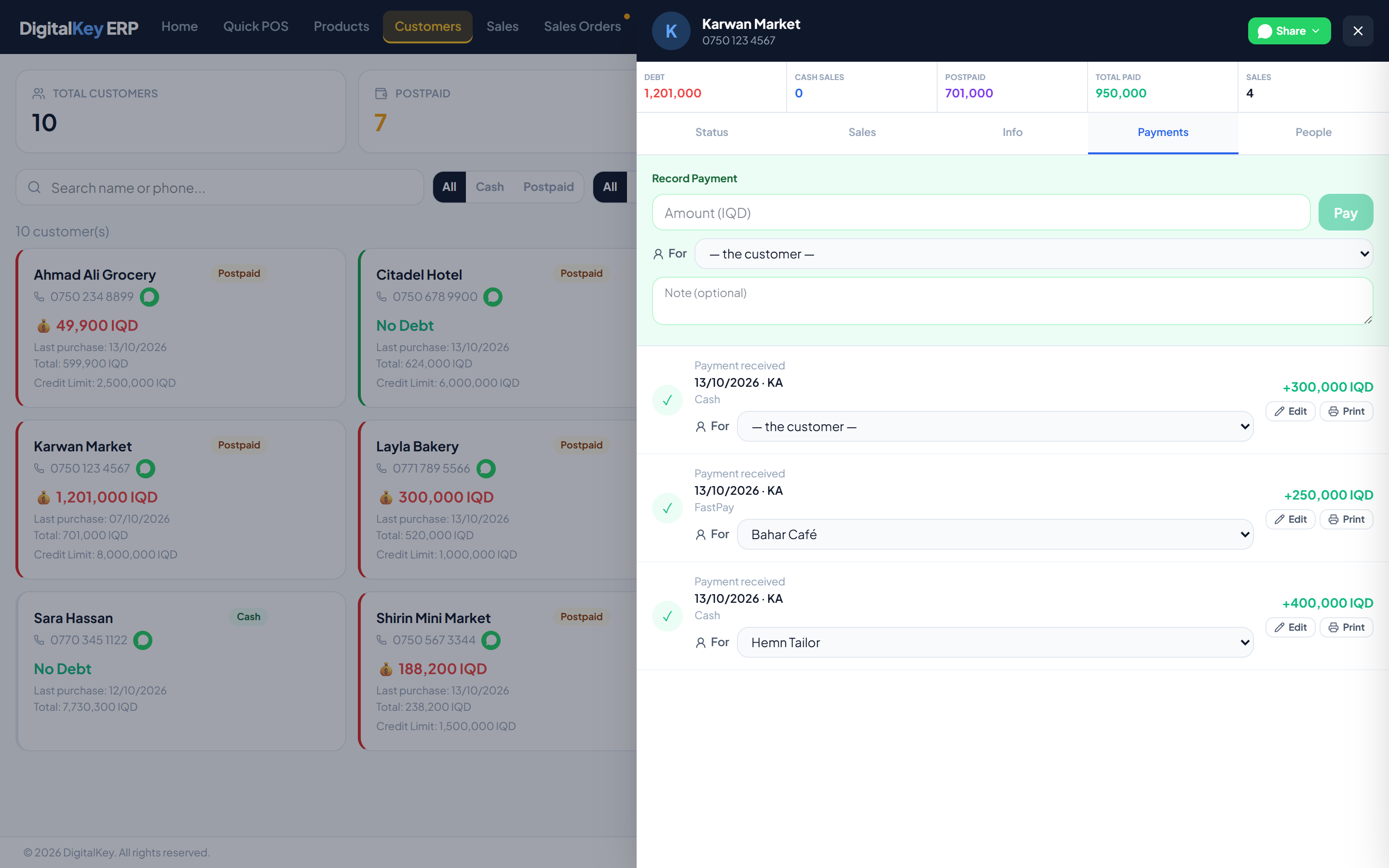
A payment reduces what a customer owes. It is recorded against the customer, not against one invoice — the balance is a single running figure, so a payment simply brings it down.
- 1
Open the customer
Find them in the customer list and open their drawer.
- 2
Go to the Payments tab
The current balance is shown at the top so you can see what is outstanding before entering anything.
- 3
Enter the amount
Type what the customer is handing over. Part payments are normal — the balance simply goes down by that much. A payment is refused when the customer owes nothing.
- 4
Add a note (optional)
Worth using to record how it was paid, or which invoice the customer believes they are settling.
- 5
Save
The balance updates immediately and the payment appears in the history with the balance before and after.
Customers — Payment recordedPayment recorded — The history showing the new entry and the reduced balance.
Payment fields
| Parameter | Type | Required | Description |
|---|---|---|---|
customer_id | integer | Required | The customer paying. |
amount | decimal | Required | Amount received. |
notes | string | Optional | Free text — payment method, reference, or which invoice it is against. |
sub_customer_id | integer | Optional | The customer's person this payment is for. Ignored without customer.sub_accounts. |
The payment record
Each payment stores the balance on either side of it, so the history is auditable without recomputing anything.
| Parameter | Type | Required | Description |
|---|---|---|---|
payment_id | integer | Optional | Identifier for the payment. |
sale_id | integer | Optional | Linked invoice, when the payment was taken against a specific sale. |
amount | decimal | Optional | Amount received. |
payment_date | timestamp | Optional | When it was recorded. |
balance_before | decimal | Optional | What they owed immediately before. |
balance_after | decimal | Optional | What they owed immediately after. |
user_initials | string | Optional | Who took the payment. |
notes | string | Optional | The note recorded with it. |
balance_before and balance_after are stored on every row, a disputed balance can be walked back through the history one payment at a time rather than reconstructed from invoices.Correcting a payment
A payment keyed with the wrong amount can be corrected. Press Edit on the payment, type the correct amount and, if useful, a note. The window shows what was recorded and how the balance will move.
- The customer's balance changes only by the difference.
- The payment keeps its original date.
- A payment cannot be deleted — correct it instead.
| Parameter | Type | Required | Description |
|---|---|---|---|
amount | decimal | Required | The correct amount. |
notes | string | Optional | A note explaining the correction. |
Marking a payment for a person
When the customer has sub-customers, a payment can be marked Forone of them, so it comes off that person's share. A payment marked for a person may not be more than that person owes.
customer.sub_accounts1,500 IQD / monthReceipts
A payment can be printed as a receipt for the customer, and shared as a link instead of printing.
customer.whatsapp_share2,000 IQD / monthPayment requests from the portal
customer.payment_request) is no longer sold. Businesses that already hold it keep it; it cannot be newly subscribed.Related
- Account Statement — the full ledger.
- Postpaid Sales — how the debt was created.
- Cash Flow — where payments show up financially.