Sell by the Piece
For a product you buy by the carton and sell both as whole cartons and as single pieces.
DigitalKey ERP — Docs · digital-key.co/docs/products/sell-by-piece
Overview
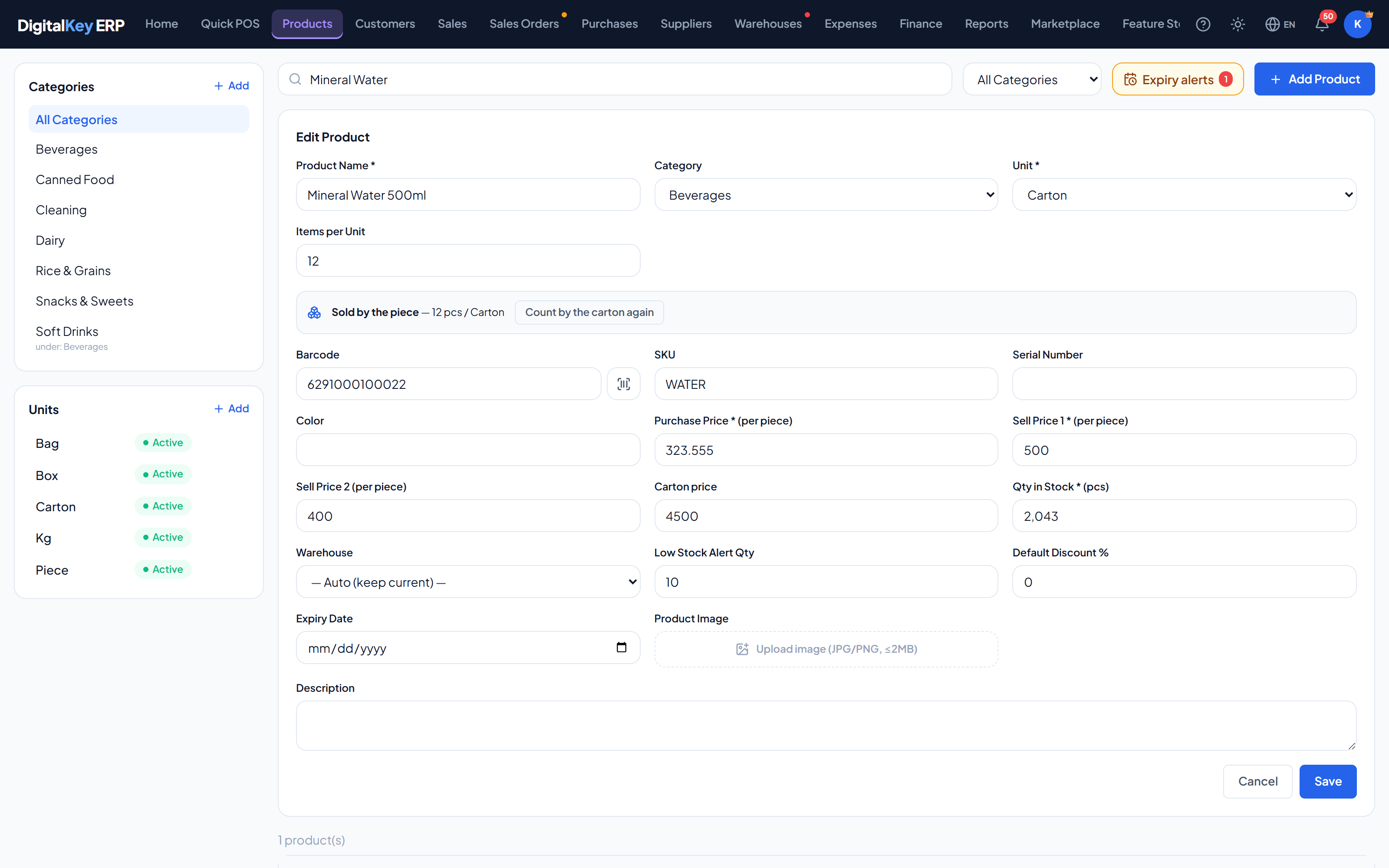
By default a product is counted in its unit: a stock of 10 means 10 cartons, and the price is the price of a carton. Switching a product to sold by the piece turns that around. Stock, cost and the selling price are then all per single piece, and the carton becomes a convenience with its own price.
| Parameter | Type | Required | Description |
|---|---|---|---|
Items per Unit | unit_qty | Required | Pieces in one carton. Must be above 1 before the product can be sold by the piece. |
Qty in stock | pieces | Optional | Counts single pieces. |
Cost | per piece | Optional | What one piece cost you. |
Price of one piece | sell_price1 | Optional | The selling price of a single piece. |
Carton price | pack_price | Optional | The price of a whole carton. Optional — without it the product is only offered by the piece at the POS. |
Switching a product over
- 1
Set Items per Unit
On the product form, enter how many pieces are in one carton. The switch stays unavailable until this is above 1.
- 2
Switch on Sell by the piece
Use the switch on the product. A confirmation explains what will be converted and asks for the price of one piece and the carton price.
- 3
Confirm
Stock is multiplied by the pieces per carton and the cost is divided by it, so the value of what you hold does not change. 10 cartons of 24 at 12,000 become 240 pieces at 500.
Selling
At the POS and on a sales order, adding the product asks Piece or Carton. One invoice can carry the same product on two rows — a carton row and a piece row — each at its own price.
- The invoice shows the quantity and price exactly as typed: “2 cartons”, “7 pieces”.
- Stock moves in pieces: a carton of 24 takes 24 off.
- The two rows share one stock, and together cannot exceed it.
- A typed carton price is compared with the cost of all its pieces.
- A return names the row it is against, so a carton and loose pieces are returned separately.
Buying
On a purchase line, Qty counts cartons. With Items per Unit set, a product sold by the piece receives Qty × Items per Unit pieces, and the carton cost is divided down to a cost per piece. You keep typing the supplier's invoice the way it is written.
Invoices from before the switch
Switching back
Count by the carton again reverses the conversion: stock is divided by the pieces per carton and the cost multiplied by it.
On reports and printouts
- Report quantity columns count line units — a carton line counts as 1.
- The printed invoice can show an Items per Unit column — the pieces in one line unit — switched on in Invoice Settings.
| Parameter | Type | Required | Description |
|---|---|---|---|
enable | boolean | Required | true to sell by the piece, false to count by the carton again. |
piece_price | decimal | Optional | Selling price of one piece. |
pack_price | decimal | Optional | Selling price of a whole carton. |
Related
- Units — the unit and Items per Unit.
- Quick Sale — choosing piece or carton at the counter.
- Receiving Goods — cartons in, pieces on the shelf.