Point of Sale
The counter screen: search a product, build a cart, take payment, print. Everything beyond the basic sale is a feature you can switch on individually.
DigitalKey ERP — Docs · digital-key.co/docs/pos
pos.quick_sale0 IQDOverview
The POS screen is the busiest part of the system, so it is built to be worked at speed with a keyboard or a barcode scanner. pos.quick_sale is free and is what gives you the screen at all — without it the POS is unavailable. Every other POS capability is a separate paid feature, so a small shop can run on the free tier and add only what it needs.
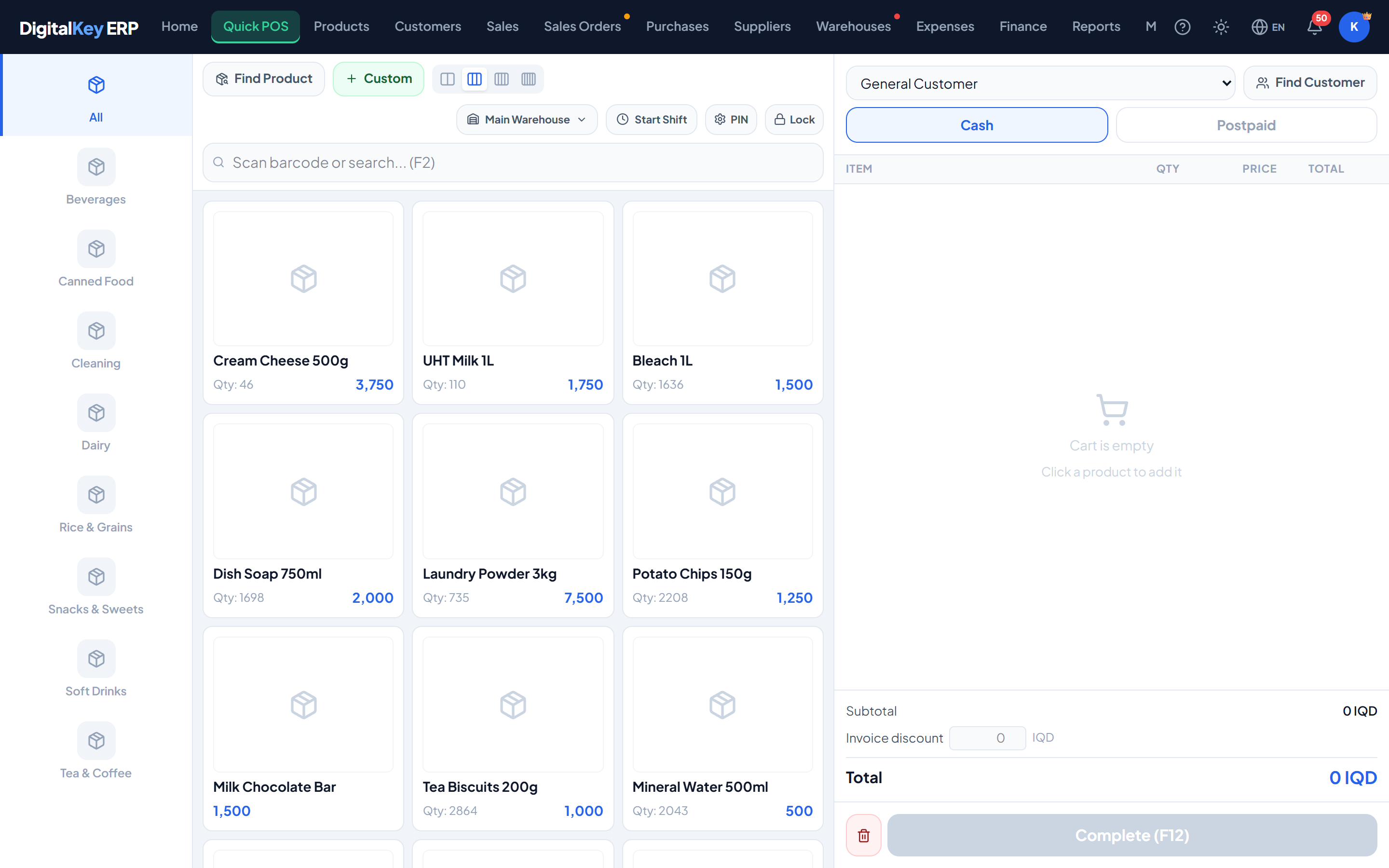
What is on the screen
- Search box — type a name, SKU or barcode, or scan. F2 puts the cursor back in it from anywhere.
- Product grid — tap a card to add it. Filter by category, and choose how many cards sit on a row to suit the size of your screen. A product with no stock is marked Out of stock and cannot be added.
- Custom — sell something that has no product record (needs
pos.extra_sell). - Cart — quantity, price and discount per line, then the totals, the amount paid and the change or the remainder going on account.
- Top bar — the active warehouse, the cashier shift and the lock button (Alt+L).
- Complete — F12 opens the confirmation, where an optional note can be typed; the note is printed on the invoice.
Rules the till enforces
These are checked on the server every time a sale is saved, for the owner and for staff alike. None of them can be switched off.
| Parameter | Type | Required | Description |
|---|---|---|---|
Not in stock | everyone | Required | A product's stock is shorter than the quantity in the cart. Counted in stock units — a carton counts as its pieces — and added up across lines. |
Below cost | everyone | Required | A typed price is lower than what the product cost you. Discounts are separate and are not part of this check. |
Over the credit limit | postpaid | Optional | A postpaid sale would take the customer past their credit limit. Cash sales are never blocked. |
No selling price | everyone | Optional | The product has no price yet — for example one created on a purchase and never priced. |
No main currency | new business | Optional | The owner has not chosen the business's main currency yet. See Main Currency. |
The POS features
These are the features in the POS module, with the monthly price of each. See Feature Store to subscribe.
| Parameter | Type | Required | Description |
|---|---|---|---|
pos.quick_sale | 0 IQD | Required | The POS screen itself. Free, and required for any selling at all. |
pos.customer_select | 2,000 IQD | Optional | Attach a customer to the sale. |
pos.discount_item | 2,000 IQD | Optional | Apply a discount to a single line in the cart. |
pos.discount_total | 2,000 IQD | Optional | Apply a discount to the invoice total. |
pos.extra_sell | 3,000 IQD | Optional | Sell an unregistered item by typing a name and price. |
pos.postpaid | 3,000 IQD | Optional | Sell on credit instead of taking payment now. |
pos.invoice_print | 5,000 IQD | Optional | Generate and print the sale invoice. |
invoice.remove_watermark | 5,000 IQD | Optional | Remove the DigitalKey mark from printed invoices. |
pos.change_calc (change calculator) and pos.low_stock_alert (low-stock warning at the counter) can no longer be bought; a business that already holds one keeps it working.Owner permissions at the till
On top of the subscription, the owner decides what each staff member may do — see Team & Permissions. These five are all off for a new staff account except returns.
| Parameter | Type | Required | Description |
|---|---|---|---|
Void a sale | off by default | Optional | Cancel a whole invoice. |
Make a return | on by default | Optional | Take goods back against an invoice. |
Edit a finished invoice (INV) | off by default | Optional | Change a completed POS sale in place. |
Change the price at the POS | off by default | Optional | Type a different price on a cart line. |
Unlock another user's POS | off by default | Optional | Use the manager override on a locked register. |
Cash shifts
A shift records the cash drawer over one period of trading: what you started with, what was sold, and what should be in the drawer at the end. Sales are recorded whether or not a shift is open — the shift exists to reconcile cash, not to gate selling.
| Parameter | Type | Required | Description |
|---|---|---|---|
opening_cash | decimal | Required | Cash in the drawer when the shift starts. |
warehouse_id | integer | Optional | Which stock location this shift sells from. Optional for single-location businesses. |
closing_cash | decimal | Required | Cash counted in the drawer at close — the physical count. |
notes | string | Optional | Handover notes — used to explain a discrepancy. |
Closing a shift shows the Z-Report before you confirm it. It can be printed.
| Parameter | Type | Required | Description |
|---|---|---|---|
shift_no | string | Optional | Reference number for the shift. |
opened_at | timestamp | Optional | When the shift was started, with its duration. |
total_sales | decimal | Optional | Value of everything sold during the shift. |
cash_sales | decimal | Optional | The part that was paid in cash. |
credit_sales | decimal | Optional | The part sold on credit — this is not in the drawer. |
invoice_count | integer | Optional | Number of invoices raised. |
void_count | integer | Optional | Number of sales voided during the shift. |
expected_cash | decimal | Optional | Opening cash plus cash sales — what the drawer should hold. |
variance | decimal | Optional | The physical count less the expected cash. |
Register lock
The POS can be locked with a 4-digit PIN so an unattended till cannot be used. The lock is per user. Lock it by hand with Alt+L, or let it lock itself after a period of inactivity.
| Parameter | Type | Required | Description |
|---|---|---|---|
pin | 4 digits | Required | The PIN used to lock and unlock the register. |
current_pin | 4 digits | Optional | Required when changing or removing an existing PIN. |
timeout_minutes | integer | Optional | Auto-lock after 1, 2, 5, 10, 15 or 30 idle minutes — or never. |
In this section
- Quick Sale — the full selling walkthrough.
- Discounts — per-item and per-invoice.
- Postpaid Sales — selling on credit.
- Print Invoice — A4 and thermal output.