Sales
Sales History
Finding a specific invoice among everything you have ever sold.
Last updated 2026-10-13
DigitalKey ERP — Docs · digital-key.co/docs/sales/history
Requires subscription
report.sales2,000 IQD / monthFilters
Filters combine — set several and only invoices matching all of them are listed. The list is paged, newest first.
Filter bar
| Parameter | Type | Required | Description |
|---|---|---|---|
Search | text | Optional | Invoice number or customer name. |
Product | text | Optional | Product name or barcode — lists every invoice that product was sold on. |
From / To | date | Optional | Sales on or between the two dates. |
Type | choice | Optional | All, Cash or Postpaid. |
Status | choice | Optional | All, Open or Returned. |
GET /api/v1/sales
| Parameter | Type | Required | Description |
|---|---|---|---|
from_date | date | Optional | Include sales on or after this date. |
to_date | date | Optional | Include sales on or before this date. |
customer_id | integer | Optional | Restrict to one customer. |
payment_type | string | Optional | Restrict to cash or postpaid. |
is_void | boolean | Optional | Show only voided, or only live, invoices. |
returned | boolean | Optional | Show only invoices with a return against them. |
invoice_no | string | Optional | Find by invoice number or customer. |
product | string | Optional | Find invoices containing a product, by name or barcode. |
page | integer= 1 | Optional | Page number for long result sets. |
page_size | integer= 50 | Optional | Rows per page, 100 at most. |
Sales — Sales list with an invoice open
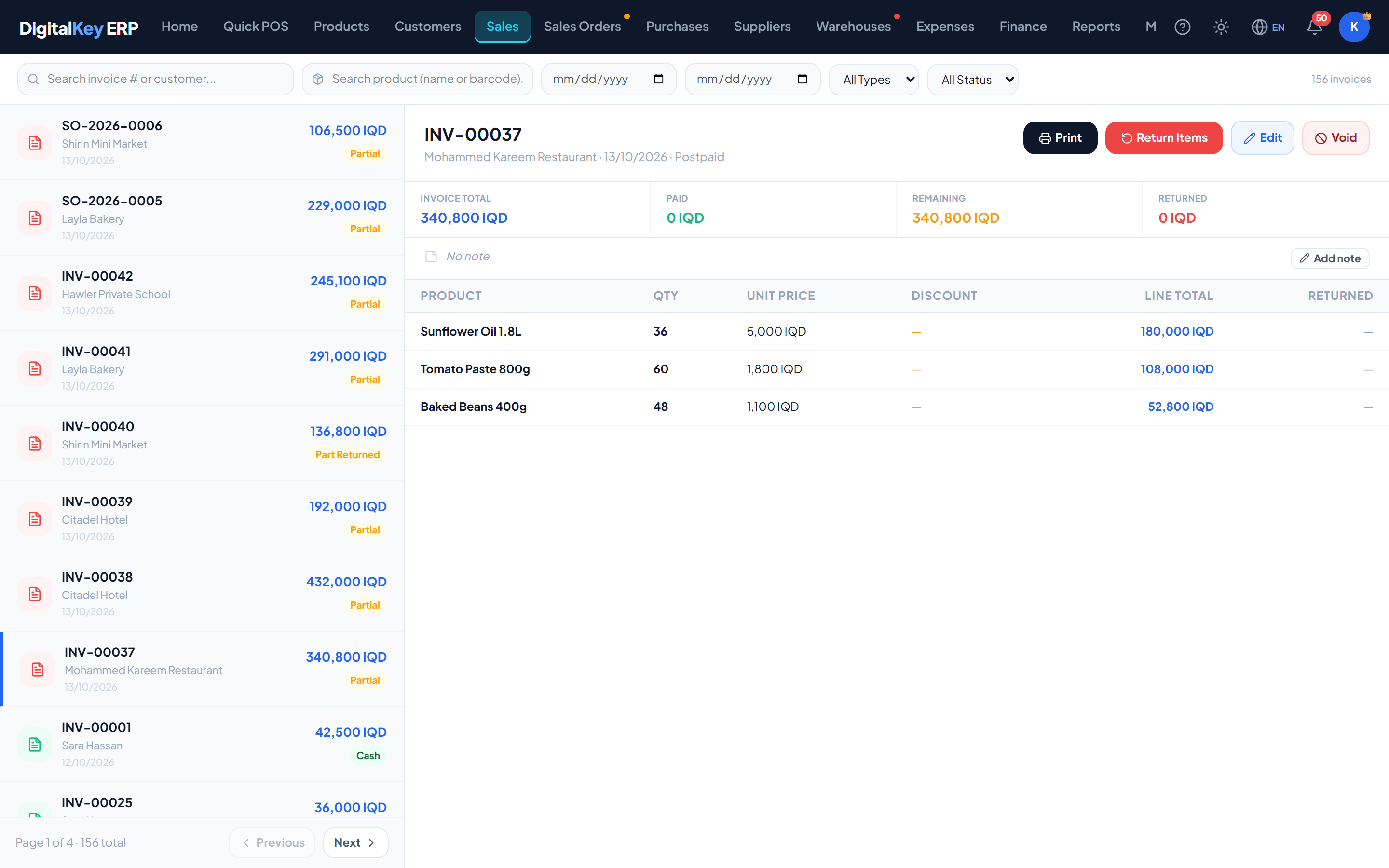
TipChasing an unpaid balance? Filter Type to Postpaid and compare each invoice's total against what was paid to see what is still outstanding.
Columns
Invoice list
| Parameter | Type | Required | Description |
|---|---|---|---|
invoice_no | string | Optional | The number shown to the customer. INV-… for a POS sale, SO-… for a completed sales order. |
sale_date | timestamp | Optional | When the sale was completed. |
customer_name | string | Optional | Customer, or General Customer for an anonymous sale. |
payment_type | string | Optional | Cash or postpaid. |
total | decimal | Optional | Invoice total after all discounts. |
paid | decimal | Optional | Amount actually received. |
remaining | decimal | Optional | Still owed on this invoice — total minus paid. |
status | badge | Optional | Void, Part Returned, Fully Returned, and “Edited n×” when the invoice has been changed. |
Opening an invoice
Selecting a row opens the full invoice, from which you can:
- See every line with its quantity, price, discount and what has been returned.
- Reprint it on A4 or thermal — the print preview is also where one invoice can be shown in another currency.
- Add or change its note.
- Edit it, if it is from this month and you are allowed.
- Record a return against it.
- Void it, if you are allowed.
- Open its edit history and return history.
Requires subscription
pos.invoice_print5,000 IQD / monthVoided invoices
NoteVoided invoices are kept and remain visible — they are marked rather than removed, so the numbering stays unbroken and an auditor can see that a void happened. They are excluded from sales totals and reports. The owner can bring one back from the recycle bin.
Exporting
NoteThe sales list itself has no export button. To take sales out of the system, use the Advanced Dynamic Report, which prints and exports to Excel (CSV) with every invoice line behind it, or the other reports under Reports.
Related
- Edit an Invoice — correcting a finished sale.
- Void a Sale — reversing an invoice.
- Print Invoice — reprinting.
- Reports — analysis over a period.