Team & Permissions
Who is on your team, and exactly what each of them is allowed to do.
DigitalKey ERP — Docs · digital-key.co/docs/settings/team-permissions
Two roles
| Parameter | Type | Required | Description |
|---|---|---|---|
owner | role | Required | Can do everything the business is subscribed to. Chooses the main currency, manages the team, sees the activity log and the recycle bin. |
staff | role | Optional | Can do what their subscription covers and the owner has left switched on. |
How access is decided
A staff member may do something only when both of these are true:
- The feature is subscribed for that user — by the platform administrator or your reseller.
- The owner has left it switched on in the permission matrix.
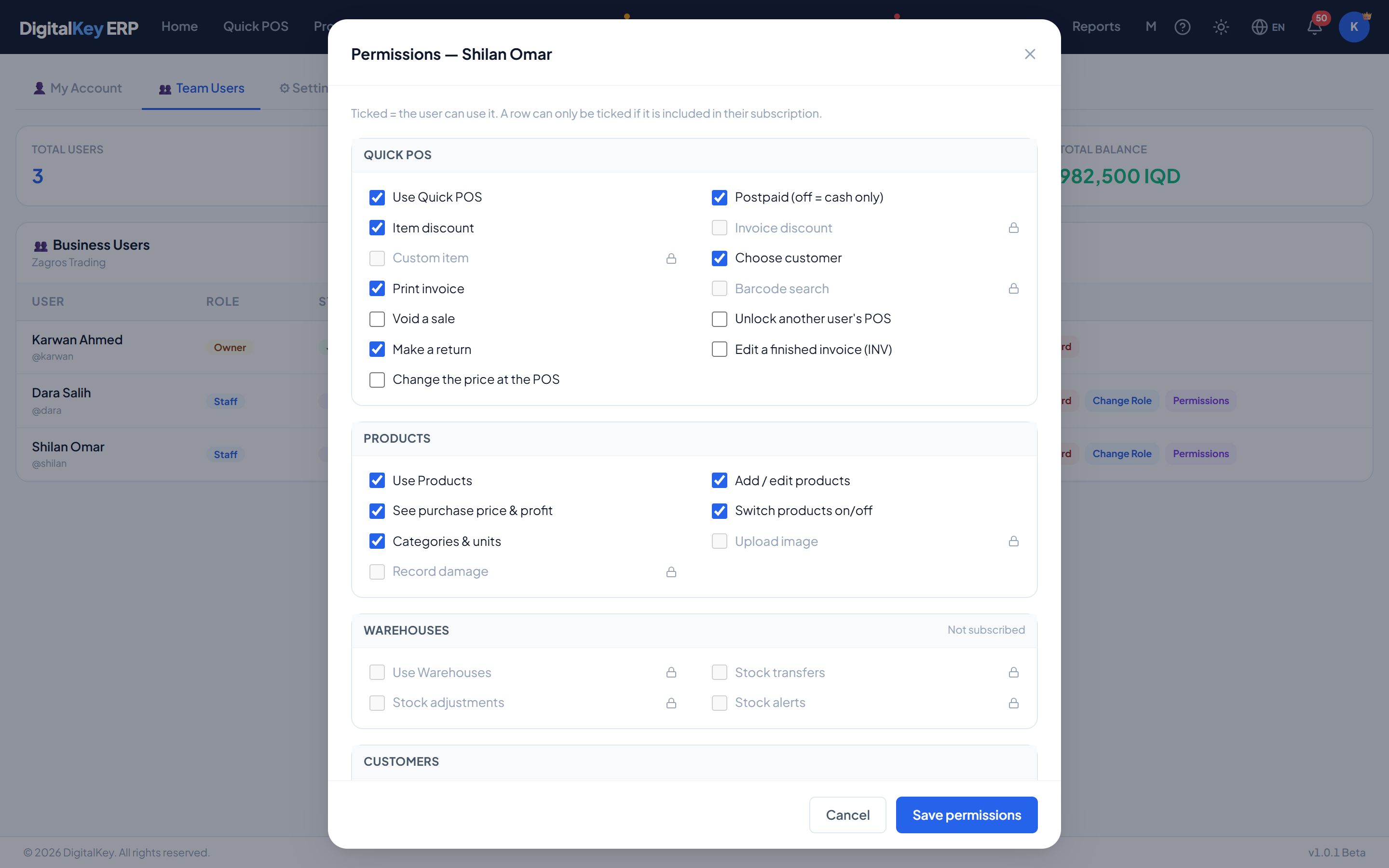
Setting permissions
- 1
Open My Account → Team Users
The tab is visible to the owner only. It lists every user of the business with their role, balance, monthly cost and next billing date.
- 2
Press Permissions on a user
The matrix opens, grouped by module: Quick POS, Products, Warehouses, Customers, Sales & orders, Purchases, Expenses, Finance, Reports.
- 3
Tick and untick
Ticked means the user can use it. Unticking a module's first row — for example Use Products — hides the whole module from them.
- 4
Save permissions
The server enforces the change immediately. The user's own screen catches up the next time it loads.
Two kinds of row
- Feature rows — switching one off hides that subscribed feature from the user: its screens, buttons and API all refuse them.
- Action rows — things inside a feature that are sensitive: voiding, approving, editing a finished invoice, seeing cost prices.
What a new staff account starts without
Everything a new staff member is subscribed to starts switched on, except these — the actions that change money or history. The owner ticks them on deliberately.
| Parameter | Type | Required | Description |
|---|---|---|---|
Void a sale | Quick POS | Optional | Cancel a POS invoice. |
Edit a finished invoice (INV) | Quick POS | Optional | Change a completed POS sale in place. |
Change the price at the POS | Quick POS | Optional | Type a different price on a cart line. |
Unlock another user's POS | Quick POS | Optional | Use the manager override on a locked register. |
Approve / reject orders | Sales & orders | Optional | Move a pending order on or send it back. |
Complete orders | Sales & orders | Optional | Fulfil an order — the point stock and money move. |
Void orders | Sales & orders | Optional | Cancel a sales order. |
See everyone's orders | Sales & orders | Optional | Without it, staff see only orders they raised. |
Edit a completed order (SO) | Sales & orders | Optional | Change a completed sales order in place. |
Void a purchase | Purchases | Optional | Cancel a purchase invoice. |
Set product cost by hand on a receipt | Purchases | Optional | Use a typed cost, or keep the current cost, when receiving. |
The home dashboard
A staff member's home page shows none of the business's figures until the owner ticks a card on under Home dashboard. Every card starts off. The owner always sees the full dashboard.
| Parameter | Type | Required | Description |
|---|---|---|---|
Sales today & this month (with chart) | Home dashboard | Optional | Today's and this month's sales, and the 14-day sales chart. |
Latest invoices | Home dashboard | Optional | The six most recent invoices. |
Amount owed & top debtors | Home dashboard | Optional | What customers owe, and who owes most. |
This month's expenses | Home dashboard | Optional | Total expenses this month. |
This month's purchase orders | Home dashboard | Optional | How many purchase orders were raised this month. |
Money in vs money out chart | Home dashboard | Optional | Six months of income against costs. Also needs View finance. |
Module shortcuts | Home dashboard | Optional | The grid of shortcut tiles to each screen. |
Other action rows
| Parameter | Type | Required | Description |
|---|---|---|---|
Make a return | Quick POS | Optional | Take goods back against an invoice. |
Add / edit products | Products | Optional | Create and change products, and switch sell-by-piece. |
See purchase price & profit | Products | Optional | Without it, cost and profit columns are hidden everywhere. |
Switch products on/off | Products | Optional | Deactivate or reactivate a product. |
Categories & units | Products | Optional | Manage the two lookup lists. |
Stock adjustments | Warehouses | Optional | Post a counted figure. |
Switch customers on/off | Customers | Optional | Deactivate or reactivate a customer. |
Purchase returns | Purchases | Optional | Send goods back to a supplier. |
Other team actions
- Reset Password — set a new password for a team member.
- Change Role — make a staff member an owner, or the reverse.
| Parameter | Type | Required | Description |
|---|---|---|---|
GET /permissions/me | endpoint | Optional | What the signed-in user may do. |
GET /permissions/catalog | endpoint | Optional | The matrix rows and the feature each one needs. |
GET /permissions/users | owner | Optional | Every team member with their subscription and what is switched off. |
PUT /permissions/{userId} | owner | Optional | Save the set of rows switched off for one user. |
Related
- Feature Store — what can be subscribed.
- Approval Workflow — the order permissions in use.
- Recycle Bin & Activity Log — seeing who did what.