Settings
Settings
Everything that configures how the system behaves for your business, rather than what is in it.
Last updated 2026-10-13
DigitalKey ERP — Docs · digital-key.co/docs/settings
Overview
Settings are reached from My Account — open it from your avatar menu at the top right. There is no separate Settings link in the navigation. The tabs you see depend on your role and what the business subscribes to.
My Account tabs
| Parameter | Type | Required | Description |
|---|---|---|---|
My Account | everyone | Optional | Your profile, balance, subscriptions and billing history. |
Team Users | owner | Optional | The team, password resets, roles and the permission matrix. |
Settings | everyone | Optional | Invoice settings — the printed invoice's logo, text and columns. |
PO Print | purchases | Optional | The printed purchase order's own layout. |
Currency | everyone | Optional | The main currency, and daily exchange rates for purchase costs. |
Workflow | sales orders | Optional | Simple or standard sales-order workflow. |
Logs | owner | Optional | The activity log — who did what. |
Recycle Bin | owner | Optional | Switched-off and voided records, with Restore. |
Settings — Settings screen
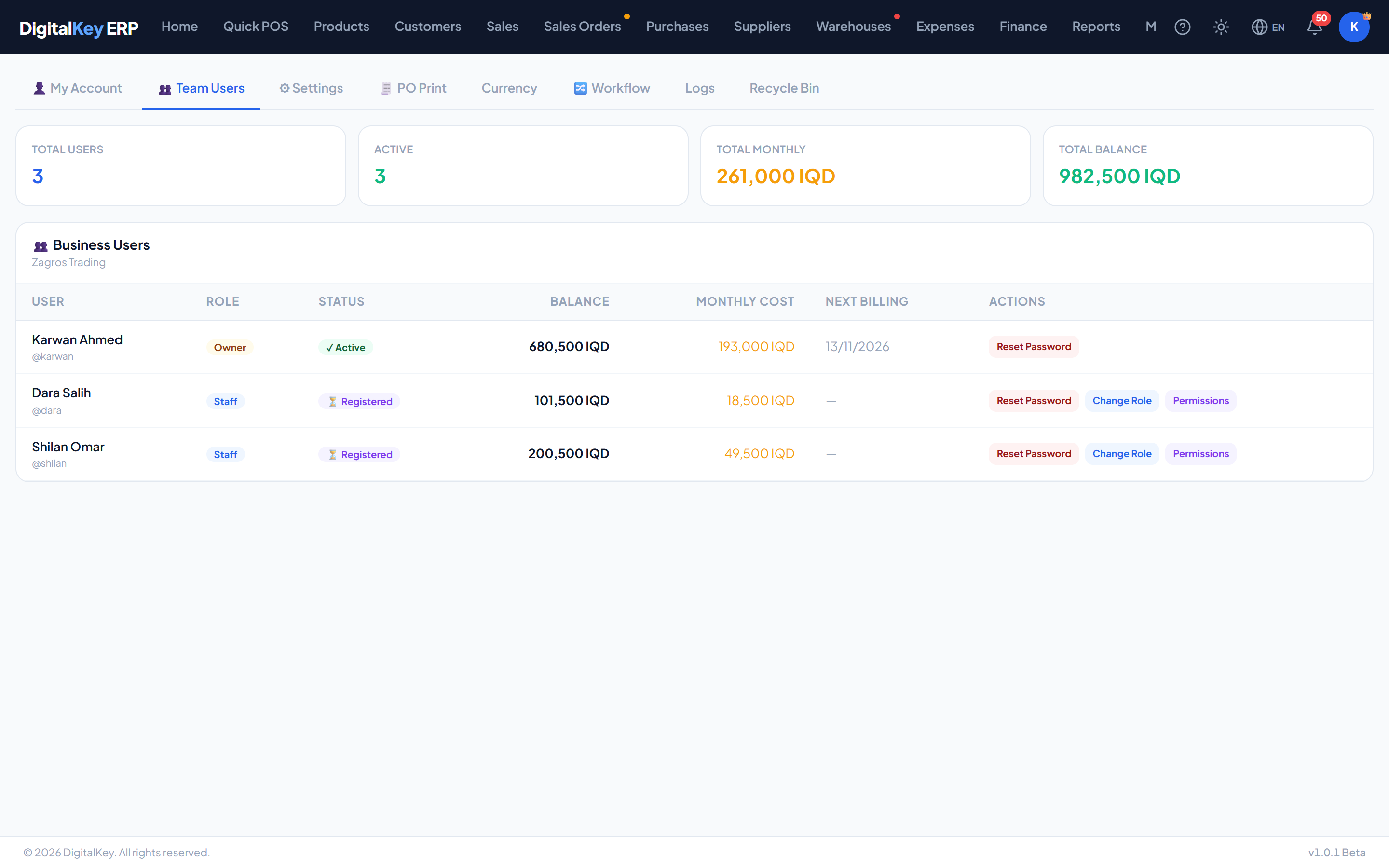
Team members
Your team is the list of users belonging to your business. From here an owner can see each member's role, balance and monthly cost, reset a password, change a role, and set exactly what each staff member may do — see Team & Permissions.
GET /api/v1/billing/team
| Parameter | Type | Required | Description |
|---|---|---|---|
user_id | integer | Optional | Identifier. |
full_name | string | Optional | Display name. |
username | string | Optional | Sign-in name. |
role | string | Optional | owner or staff. |
lifecycle_status | string | Optional | Their current account state. |
balance | decimal | Optional | Their subscription balance, in IQD. |
monthly_cost | decimal | Optional | What their subscriptions cost each month. |
next_billing_at | date | Optional | When they are next billed. |
is_active | boolean | Optional | Whether the account is enabled. |
WarningEvery user carries their own balance and is billed separately for their own subscriptions. Adding a member of staff adds a second bill — it does not share yours. See How Billing Works.
Team actions
| Parameter | Type | Required | Description |
|---|---|---|---|
PUT /billing/team/{id}/password | endpoint | Optional | Reset a team member's password. |
PUT /billing/team/{id}/role | endpoint | Optional | Change their role between owner and staff. |
NoteThe roles are owner and staff. Making someone an owner gives them everything the business subscribes to; what a staff member may do is set row by row in the permission matrix.
Sales order workflow
Owners can choose between the simple and standard workflows, provided the business subscribes to the custom workflow feature.
Requires subscription
sales_order.custom_workflow25,000 IQD / monthPUT /api/v1/sales-orders/workflow
| Parameter | Type | Required | Description |
|---|---|---|---|
mode | string= simple | Required | Either simple or standard. |
Language and theme
- Language — English, Kurdish Sorani or Arabic. The layout stays left-to-right in all three. Saved on your device.
- Theme — light, dark or follow the system. Light by default. Applies to the ERP screens; printed documents and the public site stay light.
In this section
- Invoice Settings — printed document layout.
- PO Print Settings — the printed purchase order.
- Team & Permissions — roles and the permission matrix.
- Main Currency — the business currency and exchange rates.
- Recycle Bin & Activity Log — restoring records and seeing who did what.
- My Account — your balance and subscriptions.