Landed Costs & Cost Mode
What goods really cost you is the supplier's price plus everything it took to get them onto your shelf.
DigitalKey ERP — Docs · digital-key.co/docs/purchases/landed-costs
Cost mode — how a receipt line moves the cost
When you receive a product that already has stock at a different cost, the line shows both figures and asks what to do. The stock arrives whichever you pick; the choice only decides what happens to the product's cost.
| Parameter | Type | Required | Description |
|---|---|---|---|
Use moving average | average | Required | The default. Blends the invoice cost into the weighted average. |
Enter the cost myself | manual | Optional | Blends at a cost you type instead of the invoice cost — when the invoice price is not what the goods are really worth to you. |
Keep the current cost | keep | Optional | Leaves the product's cost untouched — for a one-off price you do not want to move your margins. |
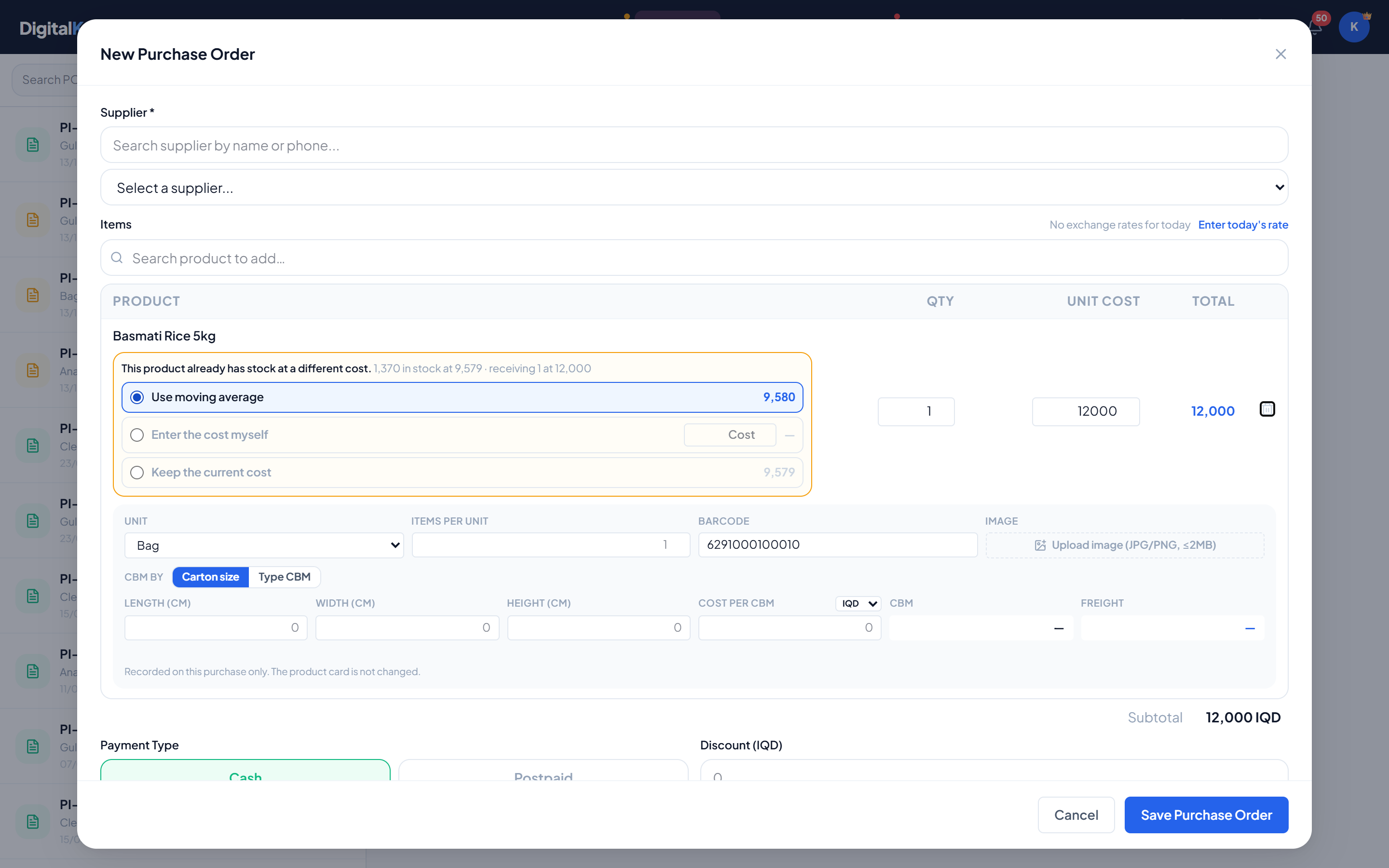
The supplier's unit cost on the invoice is never altered by the mode. What you owe the supplier is what they billed.
Landed costs
Customs, transport, clearance, insurance — charges that are not on the supplier's invoice but are part of what the goods cost. A landed cost is charged against a purchase and spread across its lines.
- 1
Open the purchase
Select it in Purchases and choose Landed Cost.
- 2
Enter the charge
Pick the type — Customs, Transport, Clearance, Insurance or Other — type the amount and, if useful, a description.
- 3
Choose how to split it
By Value (the default) gives each line a share in proportion to its cost — right for customs duty. By Quantity gives every unit the same share — right for a per-carton handling fee.
- 4
Apply Charge
The screen tells you how much went into stock value and, if some of the goods had already been sold, how much went to expenses.
Purchases — Landed costs on a purchase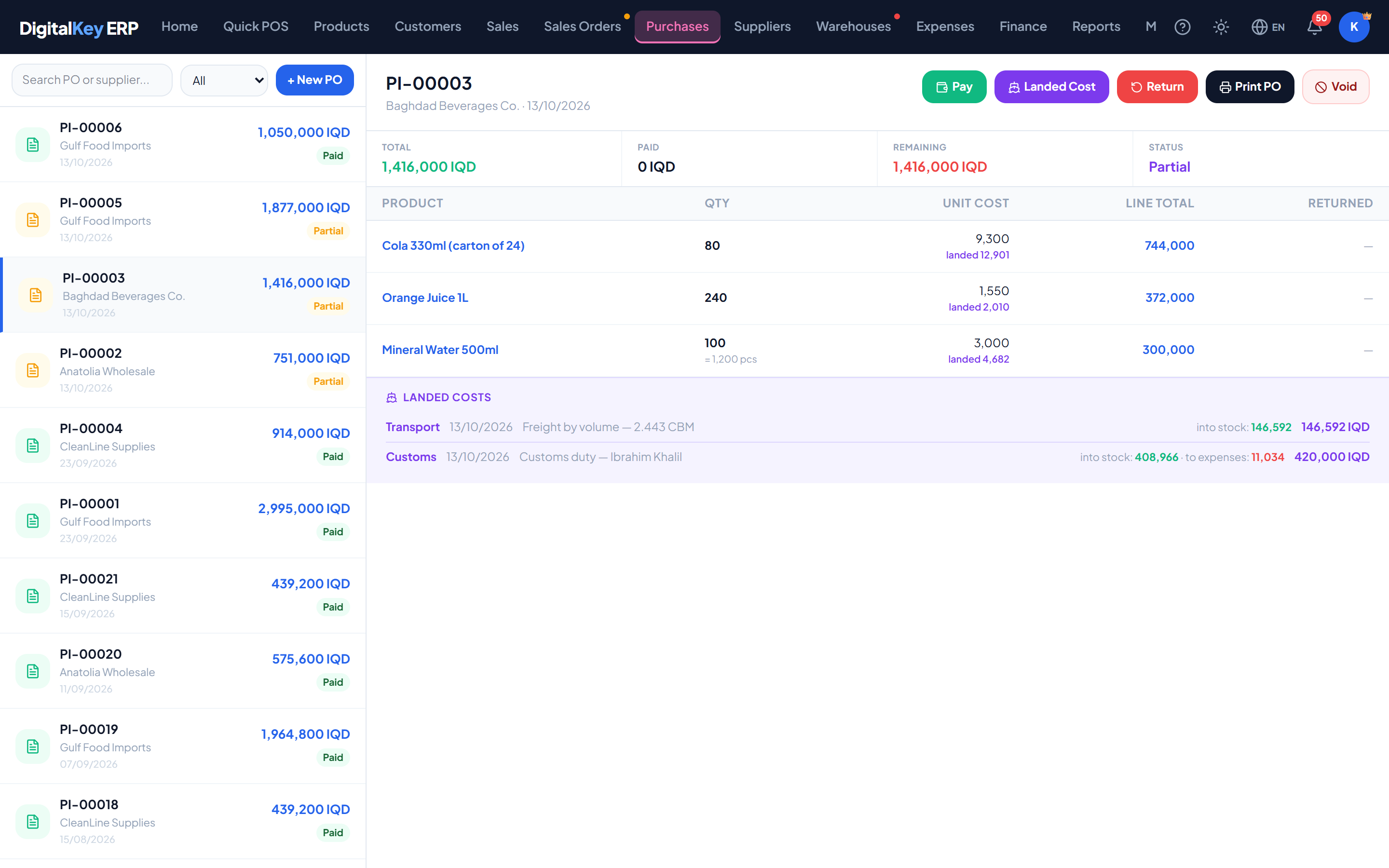
Landed costs on a purchase — A purchase with its landed cost history, showing what went into stock and what went to expenses, and the landed unit cost per line.
Where the charge goes
A landed cost is applied forward only. It is divided between the goods still on hand and the goods already gone:
| Parameter | Type | Required | Description |
|---|---|---|---|
Into stock | absorbed | Optional | The share belonging to units still on the shelf raises the product's average cost, in proportion. |
To expenses | expensed | Optional | The share belonging to units already sold is booked as an expense under “Landed Costs”. Those units took their cost with them when they sold, and are never re-costed. |
Freight by volume
Freight typed as a cost per CBM on the packing rows of a purchase is applied as a landed cost automatically, each line carrying the freight for its own volume. See Receiving Goods.
Add landed costs early
In finance
- The expensed share is an ordinary expense in the month it is booked.
- The absorbed share is cash going out too — it is counted once in the cash flow, as part of what the goods cost, and reaches profit and loss through cost of goods as the stock sells.
- Voiding the purchase takes the absorbed value back out of stock but does not get the money back from customs, and does not reverse an expense already booked.
| Parameter | Type | Required | Description |
|---|---|---|---|
cost_type | string | Required | customs, transport, clearance, insurance or other. |
amount | decimal | Required | The charge, in your main currency. |
allocation_method | string= value | Optional | value or quantity. |
description | string | Optional | Free text. |
Related
- Product Cost — the weighted average these feed.
- Receiving Goods — packing rows and freight by volume.
- Expenses — where the expensed share appears.
- Team & Permissions — the cost-override permission.