Settings
Invoice Settings
What appears on your printed invoices, receipts and statements — set once and applied to every document.
Last updated 2026-10-13
DigitalKey ERP — Docs · digital-key.co/docs/settings/invoice-settings
Overview
These settings control the printed output for the whole business. They apply to sale invoices, receipts and statements, so branding stays consistent. The printed purchase order has its own layout — see PO Print Settings — and uses these values for anything left blank there. The panel is under My Account → Settings, with a live preview beside it.
Settings — Invoice settings
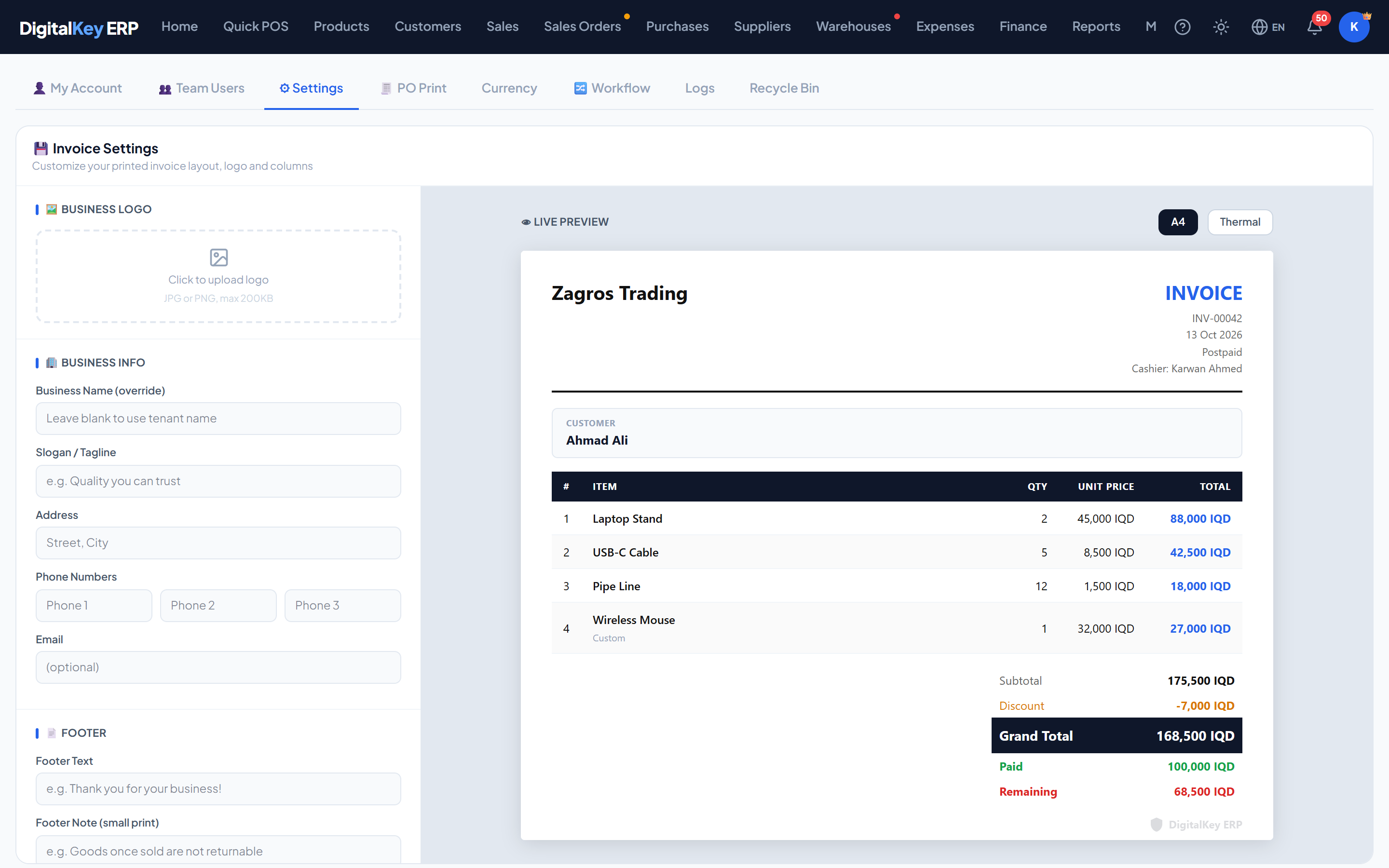
Business details
These print in the header and footer. Anything left blank is simply omitted rather than printed empty.
Header and footer
| Parameter | Type | Required | Description |
|---|---|---|---|
biz_name_override | string | Optional | Business name to print, when it differs from the registered tenant name. |
slogan | string | Optional | Tagline printed under the business name. |
address | string | Optional | Business address. |
phone1 | string | Optional | First contact number. |
phone2 | string | Optional | Second contact number. |
phone3 | string | Optional | Third contact number. |
email | string | Optional | Contact email. |
footer_text | string | Optional | Footer line — typically thanks or return policy. |
footer_note | string | Optional | Second footer line for smaller print. |
Column toggles
These decide which columns appear in the items table. Turning columns off matters most on thermal paper, where width is tight.
| Parameter | Type | Required | Description |
|---|---|---|---|
col_row_no | boolean= true | Optional | Line number. |
col_image | boolean= false | Optional | Product thumbnail. Off by default — it uses a lot of width and ink. |
col_item_name | boolean= true | Optional | Item name. |
col_qty | boolean= true | Optional | Quantity. |
col_unit_price | boolean= true | Optional | Price per unit. |
col_discount_item | boolean= false | Optional | Per-line discount. |
col_line_total | boolean= true | Optional | Line total. |
col_items_per_unit | boolean= false | Optional | Items per Unit — the pieces in one line unit (24 on a carton of water, 1 on a single piece). |
TipOn an 80mm roll, keep item name, quantity and line total and turn the rest off. Too many columns wrap and make the receipt harder to read, not more informative.
Summary blocks
| Parameter | Type | Required | Description |
|---|---|---|---|
show_subtotal | boolean= true | Optional | Subtotal before the invoice discount. |
show_discount_total | boolean= true | Optional | The invoice-level discount line. |
show_customer_name | boolean= true | Optional | The customer's name. |
show_customer_debt | boolean= false | Optional | The customer's total outstanding balance. |
show_last_payment | boolean= false | Optional | Their most recent payment. |
Warning
show_customer_debtprints the customer's full outstanding balance on every invoice they are given. It is genuinely useful for credit customers, and awkward if a receipt is handed to whoever collects the goods. Consider who receives the paper before switching it on.Logo
| Parameter | Type | Required | Description |
|---|---|---|---|
logo_data_url | string | Optional | The stored logo image. Set by uploading, cleared by deleting. Read-only in the save request. |
- Uploaded through
POST /api/v1/invoice-settings/logo. - Removed through
DELETE /api/v1/invoice-settings/logo. - Prints at the top of every document, scaled to the paper size.
NoteA wide, short logo reproduces best. Tall logos are scaled down to fit the header and can end up too small to read on a thermal receipt.
Thermal default
| Parameter | Type | Required | Description |
|---|---|---|---|
default_thermal | boolean= false | Optional | Pre-select the thermal size in the print dialog. |
TipCounter-heavy businesses should turn this on. It saves choosing the size on every sale, and A4 is still available whenever it is needed.
The DigitalKey watermark
Requires subscription
invoice.remove_watermark5,000 IQD / month| Parameter | Type | Required | Description |
|---|---|---|---|
show_dk_watermark | boolean= true | Optional | Your preference for showing the mark. |
has_remove_watermark_feature | boolean | Optional | Whether the removal feature is subscribed. Read-only. |
effective_watermark | boolean | Optional | What actually prints. Read-only. |
Important
effective_watermark is what governs the printed output, not show_dk_watermark. Without the subscription the mark prints whatever your preference says. Turning the toggle off and finding the watermark still there is expected behaviour, not a fault.Related
- Print Invoice — printing a sale.
- Account Statement — same branding.
- Feature Store — subscribing to watermark removal.